To use remote cameras in sports without harming your workflow, plan and organize your equipment beforehand. Choose reliable cameras with quick setup and remote control features, and set presets for different angles. Use wireless transmitters for flexibility and guarantee all connections are tested and labeled. Position cameras carefully to avoid interfering with the action, and maintain your gear for outdoor conditions. Proper preparation and organization will keep your coverage smooth—keep exploring to discover more tips!

Get sports gear delivered free with Prime
- Fast, free delivery on millions of items
- Prime Video, Amazon Music and more included
- Member-only deals all year
Key Takeaways
- Pre-define camera angles and settings with presets to reduce setup time during live coverage.
- Organize equipment and label cables beforehand to streamline installation and troubleshooting.
- Use reliable wireless transmission and remote controls to minimize manual adjustments and delays.
- Position cameras thoughtfully to cover key areas without obstructing action or interfering with gameplay.
- Train operators thoroughly on equipment and workflows to ensure smooth multi-camera control during events.
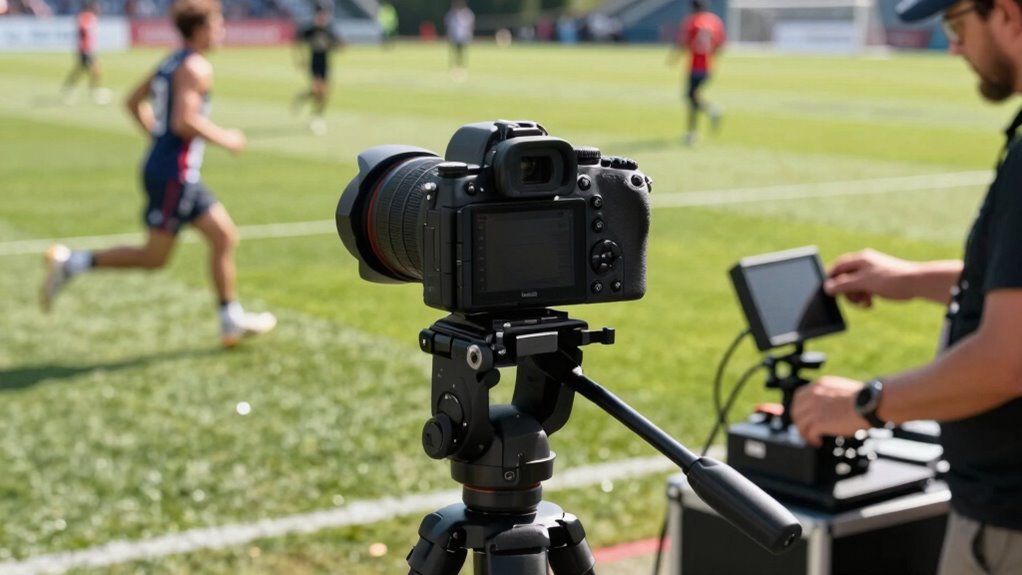
Using remote cameras in sports can dramatically enhance your coverage by providing dynamic, wide-angle, and high-angle shots that are otherwise difficult to capture. These cameras let you showcase the action from unique perspectives, making your broadcast more engaging and professional. To do this effectively, you need to pay close attention to your camera angles and equipment setup. Properly positioning your remote cameras ensures you capture the best moments without disrupting your workflow.
Remote cameras enhance sports coverage with dynamic angles, capturing key moments seamlessly while maintaining a smooth workflow.
When setting up your remote cameras, start by considering the angles that best tell the story of the game. Wide-angle shots are perfect for showing the overall play area, while high-angle shots give viewers a better sense of the field’s layout and player movement. Low or ground-level angles can add drama, especially during close plays or sideline action. Think about the flow of the game and choose positions that won’t interfere with the action but will maximize visual impact.
Your equipment setup is vital to maintaining a smooth workflow. Begin by selecting reliable cameras with quick setup times and remote control capabilities. Mount your cameras securely on tripods or specialized rigs that allow for smooth panning and tilting. Use long-range wireless transmitters to control the cameras from your main control area, reducing the need for manual adjustments on-site. This setup enables you to switch between camera angles seamlessly during live coverage, keeping the broadcast dynamic and engaging. Additionally, incorporating wireless transmission technology can significantly improve your control and flexibility during fast-paced sports events.
To avoid complicating your workflow, organize your equipment beforehand. Label cables, set presets for camera angles, and test all connections prior to the event. This way, you can make swift adjustments during the game without wasting time troubleshooting. Incorporate efficient setup techniques to streamline your process and ensure smooth operation during live broadcasts. Integrate your remote camera feeds into your main production system using a reliable switcher, and ensure your operators are well-trained on controlling multiple cameras efficiently.
Additionally, consider the placement of your remote cameras carefully. Avoid obstructing the view of officials, players, or other essential equipment. Use durable mounts and weather-resistant gear if you’re filming outdoors, and always have backup batteries and memory cards on hand to prevent interruptions. Good equipment organization can significantly streamline your setup and operation process during live events. By planning your equipment setup meticulously and thinking through your camera angles in advance, you streamline your workflow, reduce stress, and deliver a high-quality broadcast.
In the end, mastering the balance between creative camera angles and efficient equipment setup allows you to leverage remote cameras without making your workflow worse. Instead, you’ll enhance your coverage, providing viewers with compelling, professional footage that captures every vital moment of the game.
remote sports camera with wireless control
As an affiliate, we earn on qualifying purchases.
As an affiliate, we earn on qualifying purchases.
Frequently Asked Questions
What Are the Best Remote Camera Brands for Sports Coverage?
You should consider brands like Sony, Panasonic, and Canon for remote sports coverage. They excel in wireless integration, allowing seamless control over multiple cameras, and offer impressive battery longevity, so you won’t miss critical moments. These brands provide dependable remote systems that enhance your workflow without adding complexity. Their advanced features ensure high-quality footage, making them ideal choices for professional sports coverage while keeping your setup efficient and easy to manage.
How Do I Ensure Remote Camera Security During Events?
To guarantee remote camera security during events, you should prioritize remote camera encryption, which protects your data from breaches. Always use strong, unique passwords and enable multi-factor authentication to prevent unauthorized access. Regularly update your camera firmware to patch vulnerabilities, and restrict network access to trusted devices only. By implementing these steps, you markedly reduce the risk of unauthorized access, keeping your remote cameras secure throughout the event.
What Is the Average Latency for Remote Camera Feeds?
The average latency for remote camera feeds typically ranges from 100 to 300 milliseconds, depending on your setup. To keep latency low, focus on proper latency measurement and network optimization. Regularly monitor your network’s performance, prioritize bandwidth for your feeds, and use high-quality equipment. This guarantees minimal delay, providing real-time footage critical for sports events, without disrupting your workflow.
How Do I Troubleshoot Connectivity Issues With Remote Cameras?
To troubleshoot connectivity issues with remote cameras, start by checking for wireless interference from other devices, which can disrupt signals. Make sure your cameras have a stable power supply—poor power management can cause drops. Also, verify network strength and switch to a less congested Wi-Fi channel if needed. Regularly update firmware and reset the cameras to resolve persistent issues, maintaining a smooth workflow during your sports coverage.
Can Remote Cameras Be Used for Live Commentary or Only Recording?
Remote cameras can definitely be used for live commentary, thanks to wireless integration that allows real-time video transmission. Proper camera positioning is essential to capture key angles, and high-quality wireless connections ensure minimal lag. You’ll want to test your setup beforehand to avoid delays, so you can deliver smooth, professional commentary. With the right equipment and strategic positioning, remote cameras become a powerful tool for live sports coverage, not just recording.
outdoor sports camera tripod mount
As an affiliate, we earn on qualifying purchases.
As an affiliate, we earn on qualifying purchases.
Conclusion
Now, imagine yourself seamlessly weaving through the chaos of a bustling sports event, remote cameras capturing every intense moment without missing a beat. With the right setup and workflow, you’ll feel like you’re everywhere at once—eyes on the game, hands free, and focus sharp. Embrace these tools to enhance your coverage, turning the chaos into a symphony of perfect shots. Your workflow stays smooth, and the game becomes your canvas.
As an affiliate, we earn on qualifying purchases.
wireless video transmitter for cameras
As an affiliate, we earn on qualifying purchases.
As an affiliate, we earn on qualifying purchases.
Fall Picks
fall essentials
As an affiliate, we earn on qualifying purchases.