
Set up your sports smartwatch to track a workout, then check that its heart rate, GPS, and activity data are recording as expected. This guide is for beginners who have a compatible phone and watch and want to use the watch for activities such as walking, running, cycling, or gym training. Allow about 30-45 minutes for setup, plus time for your workout.

Get sports gear delivered free with Prime
- Fast, free delivery on millions of items
- Prime Video, Amazon Music and more included
- Member-only deals all year

Smartwatch with 1.96-Inch HD Touchscreen, Bluetooth Calling, Fitness Tracking, and IP68 Water Resistance
- ✔ Display: 1.96-inch HD OLED touchscreen
- ✔ Sports modes: More than 113
- ✔ Health tracking: Heart rate, sleep, and steps

T7 Smartwatch with Bluetooth Calling, 1.83-Inch Touchscreen, Fitness and Sleep Tracking, IP67 Water Resistance, Jet Black
- ✔ Display: 1.83-inch touchscreen
- ✔ Health tracking: Heart rate, blood oxygen, stress, and sleep
- ✔ Fitness tracking: Multiple sport modes; steps, distance, calories, and workout duration
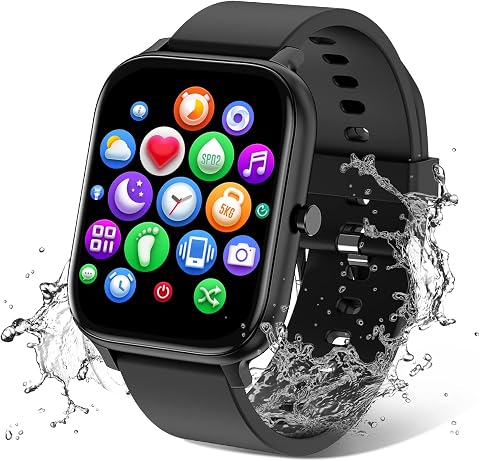
Torjalph Smart Watch with 1.83-Inch Touchscreen, IP68 Water Resistance, Fitness Tracking, and Bluetooth Notifications
- ✔ Display: Listed as 1.83 inches; another detail says 1.69 inches
- ✔ Resolution: 240 × 284
- ✔ Sports modes: 12
Difficulty: Beginner | Time: 30-45 minutes for setup; workout time varies
What You’ll Need
Tools & Materials:
- Sports smartwatch and charging cable or dock
- Compatible smartphone, if the watch requires one for setup
- Watch manufacturer’s companion app
- Wi-Fi or mobile data for app installation and account setup
Knowledge:
- Basic smartphone use
- How to charge a device and enable Bluetooth
- The activity you plan to record
Check the watch’s packaging or manufacturer’s support page for phone compatibility and water resistance. Some watches can be set up and used without a phone, but features such as maps, app syncing, and software updates may require one. Charge the watch before setup; a software update or first GPS connection may take extra time.
Smartwatch with 1.96-Inch HD Touchscreen, Bluetooth Calling, Fitness Tracking, and IP68 Water Resistance
For buyers who want one watch to cover many kinds of exercise, this model makes the strongest case in the group. Its more than 113 sports modes far exceed the T7’s multiple modes and Torjalph’s 12 listed activities. The 1.96-inch HD OLED screen is also the largest here, which may make workout information and notifications easier to scan, though the listing does not specify how much information appears during an activity.It tracks heart rate, sleep, and steps, and adds Bluetooth calling and app notifications for everyday use. The key fitness compromise is GPS: it relies on a connected smartphone, so runners who want to leave their phone at home should look elsewhere. Battery life is stated as up to seven days, shorter than the T7’s up-to-10-day claim, and actual runtime can vary with calling and tracking. IP68 is listed, but buyers should verify the manufacturer’s water-use guidance before relying on it for swimming.
Pros:
- More than 113 sports modes, the broadest stated selection in this comparison.
- Large 1.96-inch HD OLED touchscreen with customizable faces.
- Bluetooth calls, app notifications, and everyday tools such as alarms and music controls.
- Tracks heart rate, sleep, and steps.
Cons:
- GPS depends on a connected smartphone.
- Up to seven days of stated battery life is below the T7’s claim.
- Water resistance is described with both IP68 and IPX68 labels, so exact use limits warrant checking.
Best for: Buyers who want the broadest stated selection of workout modes and a large display for mixed sports and daily notifications.
Not ideal for: Phone-free runners, or swimmers who need clear, consistent confirmation of the watch’s water-use limits.
Bottom line: We rank it first for its unusually broad workout-mode selection, provided phone-dependent GPS and the water-use details suit your routine.
“We rank it first for its unusually broad workout-mode selection, provided phone-dependent GPS and the water-use details suit your routine.”
T7 Smartwatch with Bluetooth Calling, 1.83-Inch Touchscreen, Fitness and Sleep Tracking, IP67 Water Resistance, Jet Black
The T7 earns its place for buyers whose fitness routine includes wellness checks and regular daily wear, rather than a huge catalog of sport profiles. It lists heart rate, blood oxygen, stress, and sleep tracking, giving it broader stated wellness coverage than the first watch and Torjalph. Its up-to-10-day battery claim is also the longest in this lineup, which may mean fewer charging interruptions, although usage affects real-world runtime.Compared with the larger first pick, the T7 has a more compact 1.83-inch touchscreen and no GPS at all. It still supports Bluetooth calling, notifications, and several practical tools, but route tracking requires a phone-based workaround if supported by the companion setup. Its IP67 rating is the clearest limitation for active users: the listing says it is suitable for sweat, rain, and handwashing, but not swimming or hot showers. That makes it a sensible daily fitness companion, not the choice for pool workouts.
Pros:
- Tracks heart rate, blood oxygen, stress, and sleep.
- Up to 10 days of stated battery life.
- Bluetooth calling, notifications, timer, stopwatch, phone finder, and remote shutter.
- Aluminum build and 2.5D glass.
Cons:
- IP67 water resistance is not intended for swimming or hot showers.
- No GPS is listed.
- The sport-mode selection is described only as multiple modes, without a specific count.
Best for: People seeking sleep and wellness tracking, wrist-based calls, and a longer stated battery interval for everyday workouts.
Not ideal for: Swimmers, anyone wanting GPS in the watch, or buyers prioritizing a very wide range of sport modes.
Bottom line: We recommend the T7 for everyday wellness tracking and its longer battery claim, as long as swimming and onboard GPS are not priorities.
“We recommend the T7 for everyday wellness tracking and its longer battery claim, as long as swimming and onboard GPS are not priorities.”
Torjalph Smart Watch with 1.83-Inch Touchscreen, IP68 Water Resistance, Fitness Tracking, and Bluetooth Notifications
Torjalph is the simplest sports pick here: it lists 12 sports modes, including walking, running, cycling, and swimming, alongside heart rate, blood pressure, blood oxygen, and sleep monitoring. That covers familiar activities, but the first watch’s 113-plus modes offer far more variety, and the T7 provides a more explicitly described set of wellness metrics. The Torjalph listing also does not describe GPS, so we would treat it as a basic tracker that pairs with a phone rather than a standalone route companion.Its 1.83-inch color screen, silicone strap, music controls, and more than 200 watch faces support everyday use. However, the product information conflicts on both screen size and water resistance: it gives 1.69- and 1.83-inch figures and varies between IP67 and IP68. Although swimming appears among the modes, those inconsistencies make it difficult to recommend for pool use without confirming the exact model details. Its stated five-to-seven-day battery life and three-hour charging time also trail the T7’s battery claim and faster listed charge time.
Pros:
- Lists 12 modes including walking, running, cycling, and swimming.
- Tracks heart rate, blood pressure, blood oxygen, and sleep.
- Bluetooth call and message notifications plus music controls.
- More than 200 customizable watch faces.
Cons:
- Product details conflict on whether the screen is 1.69 or 1.83 inches.
- Water-resistance information varies between IP67 and IP68.
- Five-to-seven-day battery claim and three-hour charging time are less favorable than the T7’s stated figures.
Best for: Buyers who want basic activity and sleep tracking, common sport modes, and customizable faces for everyday wear.
Not ideal for: Swimmers who need dependable water-resistance details, buyers seeking extensive sport profiles, or anyone wanting clearly specified GPS.
Bottom line: We see Torjalph as a basic daily tracker, but its inconsistent listing details keep it behind the clearer, broader alternatives.
“We see Torjalph as a basic daily tracker, but its inconsistent listing details keep it behind the clearer, broader alternatives.”
As an Amazon Associate we earn from qualifying purchases.
Before You Start
Wear the watch snugly above the wrist bone, with the sensor resting flat against your skin. A loose fit can cause gaps in heart-rate readings, while a very tight fit can become uncomfortable. If you have a medical condition or take medication that affects heart rate, treat the watch’s readings as general fitness information and follow advice from your healthcare professional. GPS and wrist-based heart-rate readings can vary by setting, movement, and device.
Step-by-Step Instructions
Step 1: Charge and power on the watch
Connect the watch to its charger and wait until it has enough battery for setup and your planned workout. Press and hold the power button, or follow the on-screen prompt, to turn it on. Choose your language and region if asked.
Tip: Keep the charger nearby; setup, updates, and GPS use can drain the battery.
Check: The watch displays its setup screen or watch face and shows a charging indicator or usable battery level.
Step 2: Install the companion app
Open your phone’s official app store, search for the app named by the watch manufacturer, and install it. Check the publisher name before downloading so you do not select an unrelated app. Open the app and sign in or create an account if it requests one.
Tip: Use the manufacturer’s app listing or the QR code in the watch’s setup guide to find the correct app.
Check: The companion app opens and presents a prompt to add or pair a watch.
Step 3: Pair the watch with your phone
Turn on Bluetooth on your phone, then use the companion app’s add-device or pair-device option. Select your watch when its name appears. Confirm that the pairing code on the phone matches the code on the watch, and approve the prompts needed for connection.
Tip: Start pairing from the manufacturer’s app unless its instructions say to use the phone’s Bluetooth settings.
Check: The app shows the watch as connected, and the watch may display a confirmation or synced account details.
Step 4: Complete setup and check permissions
Follow the app’s prompts to set your profile details, units, time format, and privacy choices. Allow notifications or location access only if you want the related features. If location access is needed for GPS, permit it while using the app or device as directed by the manufacturer.
Tip: Enter your age, height, and weight accurately if the watch uses them to estimate activity or calories. These estimates are not measurements of medical precision.
Check: The app finishes setup, the watch shows the correct time, and the app lists your profile or device settings.
Step 5: Fit the watch and configure tracking
Fasten the watch just above your wrist bone so the sensor touches your skin without pinching. In the watch or app settings, check that heart-rate tracking is enabled if you want it, choose your preferred units, and set a screen lock or workout alerts if available. Review the watch’s water-resistance guidance before wearing it in water.
Tip: For activities with repeated wrist flexing, adjust the strap so the watch stays in place without restricting circulation.
Check: The sensor sits flat and steady on your wrist, and the settings show the tracking features you intend to use.
Step 6: Choose a workout and start recording
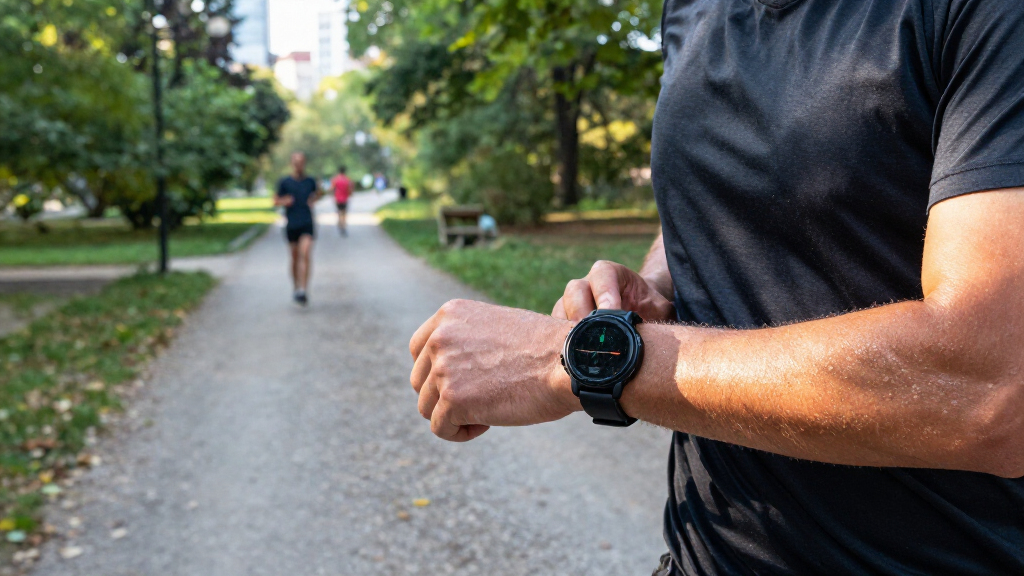
On the watch, open the exercise or workout menu and select the closest activity, such as outdoor run, indoor cycle, walk, or strength training. For an outdoor activity, move to an open area and wait for the GPS indicator to confirm a fix if your model provides one. Press Start, then begin your activity.
Tip: Selecting the matching activity helps the watch apply the right sensors and display useful metrics. Indoor workouts may not use GPS.
Check: A workout timer is running and the screen displays activity data such as duration, heart rate, pace, or distance.
Step 7: Finish and save the workout
When the activity ends, press the watch’s pause or stop control. Choose Finish, Save, or the equivalent option to store the session. Wait for any saving or syncing indicator to complete before closing the activity screen.
Tip: If the watch offers Resume and Discard, select Resume to continue recording; select Discard only when you want to delete the unsaved session.
Check: The watch returns to its face or activity menu and shows a workout summary or saved-session confirmation.
Step 8: Review the recorded data
Open the companion app and let the watch sync if needed. Select the saved workout to review its duration and available measures, such as route, distance, pace, or heart-rate graph. Compare the results with what you did and note any missing data before changing settings.
Tip: Distance and calorie totals are estimates. GPS routes may be less accurate near tall buildings, dense trees, or indoor spaces.
Check: The workout appears in the app with a date and duration, along with the metrics your watch recorded.
Common Mistakes to Avoid
- Wearing the watch too loosely or over clothing. — Fasten it above the wrist bone with the sensor touching bare skin. Keep it secure enough to avoid sliding, but comfortable enough for normal movement.
- Starting an outdoor workout before GPS is ready. — Wait in an open area for the GPS confirmation when the watch provides one. Starting under a roof or beside tall buildings can delay or weaken the signal.
- Choosing the wrong activity or forgetting to save the session. — Select the closest workout type before starting, then use the watch’s Finish or Save control at the end and check for a summary.
- Expecting fitness estimates to be exact or medical-grade. — Use watch data to follow general trends. Do not use it as a substitute for clinical measurement or medical advice.
Troubleshooting
Problem: The phone cannot find or pair with the watch.
Solution: Keep the devices close together, confirm Bluetooth is on, and check that the watch is not already paired to another phone. Restart both devices and retry from the manufacturer’s app. If the watch was previously used, follow the manufacturer’s steps to unpair or reset it before pairing again.
Problem: GPS takes a long time to connect or the route is inaccurate.
Solution: Move to an open space and wait for a GPS-ready indicator before starting. Check that location access is enabled where required, and install any available watch or app updates. Trees, buildings, tunnels, and weather can affect reception.
Problem: Heart-rate data is missing or jumps unexpectedly.
Solution: Tighten the fit slightly, position the sensor flat above the wrist bone, and clean the sensor and skin. Cold weather, vigorous arm movement, tattoos, and some activity types can affect wrist readings. Check that heart-rate tracking is enabled.
Problem: The workout does not appear in the phone app.
Solution: Open the app while the watch is nearby, confirm Bluetooth is connected, and wait for syncing to finish. Check that the workout was saved on the watch and that the app is signed into the account paired with it.
What Success Looks Like
Your watch is paired or ready for standalone use, sits securely on your wrist, and records a workout with a timer and the metrics supported by your model. After saving and syncing, the workout appears in the watch or companion app with a date and duration. GPS routes and heart-rate readings can vary; check that data is present and broadly matches the activity rather than expecting exact values.
Next Steps
Charge the watch after workouts when its battery is low, clean the sensor and strap according to the manufacturer’s care instructions, and review your activity history periodically for trends. Keep the watch and companion app updated. Before swimming or showering with it, confirm the specific water-resistance rating and care guidance for your model.
Frequently Asked Questions
Can I use a sports smartwatch without a phone?
Some models can record workouts, heart rate, and GPS routes without a phone. Setup, maps, software updates, and syncing may still require a compatible phone or computer. Check the features listed for your exact model.
Do I need to start a workout manually?
Many watches can detect some activities automatically, but manual start gives you a clear session record and may improve the choice of activity metrics. Use automatic detection only if your model supports it and you prefer that workflow.
Why does the watch show a different distance from a treadmill?
A treadmill’s displayed distance and the watch’s estimate can differ because the watch may infer indoor distance from arm movement and stride. Use the watch’s calibration feature if available, and compare results over several sessions.
Can I wear the watch while swimming?
Only if the manufacturer’s specifications allow swimming for your model. Water resistance can differ by model and may be affected by age, damage, soap, or heat. Follow the care instructions after water exposure.