
The best 25Gbps Thunderbolt Ethernet adapters in this roundup are the Sonnet Twin25G T5 for a dual-port Thunderbolt 5 setup and the GOWENIC 25Gbps Thunderbolt 3 adapter for a single SFP connection. The IO CREST USB4 model is another option for buyers seeking dual 25GbE ports, while Cable Matters’ 5GbE and 2.5GbE adapters suit networks that cannot use 25GbE. The main tradeoffs are host bandwidth, SFP28 versus RJ45 cabling, port count, and whether your network can actually deliver multi-gigabit speeds. Many products listed as Ethernet adapters are limited to 2.5GbE or 5GbE, so the fastest advertised category does not describe every pick here. Read on for the full breakdown and a guide to matching adapter speed to your host and network.

Get sports gear delivered free with Prime
- Fast, free delivery on millions of items
- Prime Video, Amazon Music and more included
- Member-only deals all year
Complete the kit


Key Takeaways
- Sonnet Twin25G T5 is the clear premium 25GbE pick: it pairs Thunderbolt 5 with two SFP28 ports, but makes sense only when the host, switches, and network workload can use that capacity.
- GOWENIC offers a single-port 25GbE route over Thunderbolt 3: it can suit a simpler SFP-based setup, though it does not match Sonnet’s dual-port layout.
- IO CREST also targets dual 25GbE over USB4: check host compatibility and the full system path before treating its port count as usable throughput.
- Most of the lineup is not 25GbE: the UGREEN, Plugable, uni, and Cable Matters 2.5GbE models trade peak speed for a more accessible fit with ordinary multi-gigabit networks.
- USB-C describes the connector, not the speed class: the Cable Matters 5GbE adapter sits between the 2.5GbE choices and the SFP28 products, while its 140W-charging variant adds a separate convenience feature.
| GOWENIC 25Gbps Thunderbolt 3 to SFP Network Adapter |  | Closest Match to 25Gbps Thunderbolt | Interface: Thunderbolt 3 | Stated data transfer rate: Up to 25Gbps | Connector: SFP listed; description also mentions RJ45 | VIEW LATEST PRICE | See Our Full Breakdown |
| Plugable 2.5G USB-C and USB to Ethernet Adapter – Dual-Connector 2-in-1 USB-C to RJ45 2.5Gbps LAN |  | Best for Port Flexibility | Maximum speed: 2.5Gbps | Connectors: USB-C and USB-A | Ethernet connection: RJ45 | VIEW LATEST PRICE | See Our Full Breakdown |
| UGREEN USB C to Ethernet Adapter 2.5G, Aluminum Ethernet Adapter for Laptop, MacBook, XPS, iPhone 17 Pro/Max | 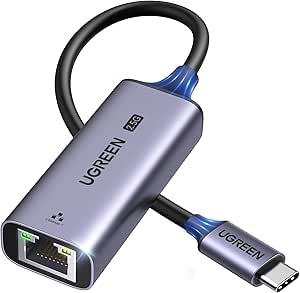 | Best Compact Aluminum Pick | Interface: USB 3.0 Type-C | Maximum data transfer rate: 2.5Gbps | Compatible devices: Desktop, laptop, smartphone, tablet | VIEW LATEST PRICE | See Our Full Breakdown |
| USB C to Ethernet Adapter 2.5Gbps, USB 3.0 to Ethernet 2-in-1 for Laptop, MacBook, iPad, Windows |  | Best for Mixed-Device Households | Maximum speed: 2.5Gbps | Interfaces: USB-C and USB-A | Backward compatibility: 100Mbps and 1Gbps | VIEW LATEST PRICE | See Our Full Breakdown |
| uni USB-C to Ethernet Adapter 2.5 Gbps, Thunderbolt 3/4 Compatible |  | Best for Travel Durability | Maximum speed: 2.5Gbps | Connection: USB-C | Compatibility: Thunderbolt 3 and 4 | VIEW LATEST PRICE | See Our Full Breakdown |
| Sonnet Twin25G T5 Thunderbolt 5 Dual 25GbE SFP28 Network Adapter |  | Best Overall for Dual-Port 25GbE | Computer interface: Thunderbolt 5 / USB4; compatible with Thunderbolt 3 and 4 | Network ports: 2 × 25GbE SFP28 | Included transceivers: 2 × 25GBASE-SR SFP28 optical modules | VIEW LATEST PRICE | See Our Full Breakdown |
| Cable Matters USB C to 5Gb Ethernet Adapter, 5 Gigabit Ethernet to USB C |  | Best for a Simple 5GbE Upgrade | Host interface: USB Type-C | Ethernet speed: Up to 5 Gbps | USB requirement for full speed: USB 3.2 Gen 2 or higher | VIEW LATEST PRICE | See Our Full Breakdown |
| Cable Matters USB C to 2.5Gb Ethernet Adapter |  | Best Compact 2.5GbE Pick | Host interface: USB-C | Ethernet speed: Up to 2.5 Gbps | Supported device types: Desktop, game console, laptop, smart TV | VIEW LATEST PRICE | See Our Full Breakdown |
| IO CREST USB4 Type-C to Dual 25GbE SFP28 Network Adapter |  | Best for USB4 Docking and Expansion | Host interface: USB4 Type-C, 40 Gbps | Thunderbolt compatibility: Thunderbolt 3, 4, and 5 | Network ports: 2 × 25GbE SFP28 | VIEW LATEST PRICE | See Our Full Breakdown |
| Cable Matters USB C to 2.5Gb Ethernet Adapter with 140W Charging |  | Best for Ethernet and Laptop Charging | Ethernet speed: 2.5 Gbps | Power delivery: Up to 140 W | Compatible devices: MacBook, iMac, Dell XPS, iPad Pro, Surface | VIEW LATEST PRICE | See Our Full Breakdown |
| 25Gbps Thunderbolt Ethernet adapter | Weight |
|---|---|
| GOWENIC 25Gbps Thunderbolt 3 t | 263 g |
| Plugable 2.5G USB-C and USB to | — |
| UGREEN USB C to Ethernet Adapt | 33.5 g |
| USB C to Ethernet Adapter 2.5G | — |
| uni USB-C to Ethernet Adapter | — |
| Sonnet Twin25G T5 Thunderbolt | 4.3 lb |
| Cable Matters USB C to 5Gb Eth | 0.04 kg |
| Cable Matters USB C to 2.5Gb E | 0.03 kg |
| IO CREST USB4 Type-C to Dual 2 | — |
| Cable Matters USB C to 2.5Gb E | — |
More Details on Our Top Picks
GOWENIC 25Gbps Thunderbolt 3 to SFP Network Adapter
Among these five products, the GOWENIC is the only one specified for 25Gbps and Thunderbolt 3, so it is the closest fit for a roundup focused on high-bandwidth Thunderbolt networking. Its compact aluminum shell is suited to a laptop setup, while the stated plug-and-play design may simplify connection. The tradeoff is that the product details conflict: the title lists an SFP connector, but the description also mentions RJ45. That matters because buyers need the right physical network connection, and the listing does not settle the question. By comparison, the Plugable, UGREEN, and uni adapters clearly use USB connections but top out at 2.5Gbps. I would treat GOWENIC as a candidate only after confirming connector type, host support, and compatibility with the intended network equipment.
Pros:- Specifies up to 25Gbps, unlike the 2.5Gbps USB adapters in this group
- Thunderbolt 3 interface
- Compact 263 g aluminum alloy enclosure
- Plug-and-play setup is stated in the description
Cons:- Connector information conflicts between SFP and RJ45
- Compatibility details are limited to macOS and USB4 references
- The listing does not provide enough detail to confirm network-side requirements
Best for: MacOS laptop owners building a 25Gbps network who can confirm the adapter’s connector and host compatibility before buying
Not ideal for: Buyers who need a clearly documented RJ45 connection, broad operating-system support, or a straightforward plug-in replacement for gigabit Ethernet
- Interface:Thunderbolt 3
- Stated data transfer rate:Up to 25Gbps
- Connector:SFP listed; description also mentions RJ45
- Compatible operating system:macOS
- Compatible device:Laptop
- Material:Aluminum alloy
- Weight:263 g
Our verdict“Choose GOWENIC only if you need a listed 25Gbps Thunderbolt option and can verify its connector and compatibility before purchase.”
Plugable 2.5G USB-C and USB to Ethernet Adapter – Dual-Connector 2-in-1 USB-C to RJ45 2.5Gbps LAN
The Plugable earns its place for USB-C and USB-A flexibility, not for matching the 25Gbps target: its listed ceiling is 2.5Gbps. The swappable connection options make it useful for households or offices that move between newer laptops and older computers, and its stated support spans Windows, macOS, ChromeOS, and iOS. Compared with GOWENIC, it gives up a large amount of stated bandwidth but presents a clearer, more versatile everyday connection. The UGREEN and uni adapters also reach 2.5Gbps, but their product details do not emphasize the same dual-connector arrangement. Buyers still need compatible USB 3.0-or-better hardware, suitable cabling, and a network faster than gigabit to see the benefit; this is not a substitute for a true 25Gbps adapter.
Pros:- Dual USB-C and USB-A connector design
- Supports up to 2.5Gbps Ethernet
- Compatibility listed for Thunderbolt 4 and 5, USB4, and USB 3.0
- Broad stated operating-system support and lifetime support
Cons:- 2.5Gbps is far below the 25Gbps focus of this roundup
- Full performance depends on USB 3.0 or better, network equipment, and cabling
- Network and internet service limits can keep actual speeds below the adapter’s stated rate
Best for: People who share one Ethernet adapter among USB-C laptops and USB-A computers and want speeds above gigabit
Not ideal for: Users seeking 25Gbps Thunderbolt networking, or anyone whose network equipment and internet plan stay at gigabit speeds
- Maximum speed:2.5Gbps
- Connectors:USB-C and USB-A
- Ethernet connection:RJ45
- Listed interfaces:Thunderbolt 4 and 5, USB4, USB 3.0
- Operating-system compatibility:Windows, macOS, ChromeOS, iOS
- Recommended cabling:Cat 5e or better
- Support:2-year warranty; lifetime support
Our verdict“Pick the Plugable for a shared USB-C/USB-A adapter that exceeds gigabit, not for 25Gbps Thunderbolt speeds.”
UGREEN USB C to Ethernet Adapter 2.5G, Aluminum Ethernet Adapter for Laptop, MacBook, XPS, iPhone 17 Pro/Max
At 33.5 g, the UGREEN is the lightest specified option in this batch, making it a better fit for a laptop bag than the 263 g GOWENIC. Its aluminum body and 2.5Gbps USB-C connection suit users who want a wired network upgrade for a portable device, provided the router or switch also supports 2.5Gb Ethernet. It is not a 25Gbps Thunderbolt adapter: compared with GOWENIC’s stated 25Gbps capability, UGREEN offers a simpler, lower-bandwidth USB 3.0 Type-C connection. Its compatibility information also needs care: the description names several device types, while the specifications list Android 13.0 and Windows 11. Buyers should check support for their exact host before relying on it, particularly if they use macOS or another operating system.
Pros:- Lightweight 33.5 g design
- Aluminum construction with reinforced ports
- Supports up to 2.5Gbps Ethernet
- USB-C form factor suits compatible laptops and mobile devices
Cons:- Does not approach the 25Gbps speed specified for GOWENIC
- Listed operating-system support is narrower than the device claims may suggest
- Requires compatible 2.5Gbps network equipment to exceed gigabit speeds
Best for: Laptop and smartphone owners who want a lightweight 2.5Gbps USB-C Ethernet adapter for travel or a compact desk setup
Not ideal for: Buyers requiring 25Gbps Thunderbolt performance or those who need clearly documented compatibility across several operating systems
- Interface:USB 3.0 Type-C
- Maximum data transfer rate:2.5Gbps
- Compatible devices:Desktop, laptop, smartphone, tablet
- Listed operating systems:Android 13.0, Windows 11
- Dimensions:2.4 × 1 × 0.6 in
- Weight:33.5 g
- Color:Space Grey
Our verdict“Choose UGREEN for a lightweight 2.5Gbps USB-C adapter, but verify host support and skip it if you need 25Gbps Thunderbolt.”
USB C to Ethernet Adapter 2.5Gbps, USB 3.0 to Ethernet 2-in-1 for Laptop, MacBook, iPad, Windows
This adapter’s strongest distinction is its USB-C and USB-A interface pairing alongside listed support for Windows, macOS, Android, Linux, and Chrome OS. That makes it a practical shared option for people connecting different kinds of laptops, tablets, or game consoles. Its 2.5Gbps ceiling is still a long way from the roundup’s 25Gbps brief; like the Plugable, it is better viewed as a flexible faster-than-gigabit adapter than a high-bandwidth Thunderbolt solution. Compared with Plugable, the listing gives a particularly broad platform list and names a Realtek chipset, while Plugable explicitly lists Thunderbolt 4 and 5, USB4, and a support term. Maximum speed also depends on the rest of the setup, including the stated need for Cat 6 or better cable. Older systems may need a driver.
Pros:- USB-C and USB-A interfaces support varied host devices
- Operating-system list includes Windows, macOS, Android, Linux, and Chrome OS
- Supports up to 2.5Gbps with compatible network hardware
- Backward compatible with 100Mbps and 1Gbps networks
Cons:- 2.5Gbps maximum does not meet the 25Gbps target
- Cat 6 or better cabling is specified for maximum speed
- Older operating systems may require driver downloads
Best for: Households or teams connecting USB-C and USB-A devices across several operating systems to a 2.5Gbps wired network
Not ideal for: Buyers needing a 25Gbps Thunderbolt adapter or users who want explicit compatibility details for their exact device and a no-driver guarantee on older systems
- Maximum speed:2.5Gbps
- Interfaces:USB-C and USB-A
- Backward compatibility:100Mbps and 1Gbps
- Supported systems:Windows, macOS, Android, Linux, Chrome OS
- Listed device types:Laptops, tablets, smartphones, game consoles
- Chipset:Realtek
- Recommended cabling for maximum speed:Cat 6 or higher
Our verdict“Choose this adapter for broad USB and operating-system coverage across mixed devices, not for 25Gbps Thunderbolt networking.”
uni USB-C to Ethernet Adapter 2.5 Gbps, Thunderbolt 3/4 Compatible
The uni’s aluminum housing and braided nylon cable give it a more travel-ready build profile than the product details provided for UGREEN, while its listed Thunderbolt 3/4 compatibility helps it fit many modern laptop setups. Its network speed is 2.5Gbps, though, so Thunderbolt compatibility should not be mistaken for 25Gbps performance. GOWENIC is the closer match to this roundup’s bandwidth target, with a stated 25Gbps rate, while uni is the more conventional USB-C option for users whose network tops out at 2.5Gbps. The uni also lists backward compatibility with 10, 100, and 1000Mbps networks, which can ease use across older equipment. Buyers still need compatible 2.5Gbps network hardware to reach its full rate, and it provides Ethernet only.
Pros:- Aluminum body and braided nylon cable suit frequent transport
- 2.5Gbps Ethernet capability
- Listed compatibility with Thunderbolt 3 and 4
- Backward compatible with 10, 100, and 1000Mbps networks
Cons:- 2.5Gbps maximum is far below GOWENIC’s stated 25Gbps rate
- Maximum speed requires compatible 2.5Gbps equipment throughout the network
- Provides Ethernet connectivity only
Best for: Frequent travelers and mobile professionals who want a durable USB-C Ethernet adapter for a Thunderbolt 3 or 4 laptop
Not ideal for: Users who need 25Gbps throughput, USB-A connectivity, or a network adapter with features beyond wired Ethernet
- Maximum speed:2.5Gbps
- Connection:USB-C
- Compatibility:Thunderbolt 3 and 4
- Materials:Aluminum housing; braided nylon cable
- Supported network speeds:2.5Gbps, 1000Mbps, 100Mbps, 10Mbps
- Listed compatible devices:MacBook Pro/Air 2023, Mac mini M2, HP Envy x360, Dell XPS series
- Warranty and support:18-month warranty; 24/7 support
Our verdict“Pick the uni for a durable, travel-friendly 2.5Gbps adapter for Thunderbolt 3/4 laptops, not for 25Gbps networking.”
Sonnet Twin25G T5 Thunderbolt 5 Dual 25GbE SFP28 Network Adapter
For buyers who need two native 25GbE connections, the Sonnet Twin25G T5 is the most complete fit in this group. It includes two 25GBASE-SR SFP28 optical transceivers and a Thunderbolt 5 cable, so it is geared toward fiber networks rather than a direct RJ45 connection. Its Thunderbolt 5 bandwidth supports both ports operating at full rate, while compatibility with Thunderbolt 3, 4, USB4, and 10GbE gear broadens its usefulness across mixed setups. Compared with the IO CREST USB4 adapter, Sonnet specifies included optical modules and a supplied Thunderbolt 5 cable, which makes the stated package clearer for fiber deployment. The tradeoff is substantial: this is a specialized, 4.3-pound adapter, and it only makes sense if your computer and network infrastructure can use SFP28. For ordinary wired access, the Cable Matters 5GbE adapter is simpler.
Pros:- Two 25GbE SFP28 ports support simultaneous high-bandwidth links.
- Includes two 25GBASE-SR optical transceivers and a Thunderbolt 5 cable.
- Compatible with Thunderbolt 3, 4, 5, and USB4 systems.
- Supports macOS, Windows, Linux, and backward compatibility with 10GbE.
Cons:- Requires SFP28 fiber infrastructure rather than offering a standard RJ45 port.
- Needs a Thunderbolt 3-or-newer or USB4 connection to the computer.
- At 4.3 pounds, it is less suited to portable setups than USB-C Ethernet adapters.
Best for: Studio, workstation, and server users who need two 25GbE fiber links and use a Thunderbolt or USB4 computer.
Not ideal for: Laptop users seeking a small RJ45 adapter, or anyone without SFP28 fiber equipment and a compatible Thunderbolt or USB4 port.
- Computer interface:Thunderbolt 5 / USB4; compatible with Thunderbolt 3 and 4
- Network ports:2 × 25GbE SFP28
- Included transceivers:2 × 25GBASE-SR SFP28 optical modules
- Per-port data rate:25 Gbps
- Operating systems:macOS, Windows, Linux
- Network compatibility:Backward compatible with 10GbE
- Dimensions:5.9 × 3.1 × 11.6 in
- Weight:4.3 lb
- Warranty:2-year limited warranty
Our verdict“Choose the Sonnet when you need two 25GbE fiber ports in a cross-platform Thunderbolt adapter and can accommodate its specialized setup.”
Cable Matters USB C to 5Gb Ethernet Adapter, 5 Gigabit Ethernet to USB C
The Cable Matters USB-C to 5Gb Ethernet Adapter suits buyers who want a faster-than-gigabit wired connection without adopting a 25GbE fiber setup. Its 5Gbps link rate sits between the dual-port 25GbE options from Sonnet and IO CREST and the 2.5Gbps adapters in this roundup, making it a more accessible match for a capable USB-C host and a 5GbE network. The aluminum housing and braided cable are practical choices for a frequently connected adapter, while plug-and-play support avoids driver setup on macOS. Unlike Sonnet’s SFP28 device, this is a straightforward USB-C Ethernet option rather than a fiber workstation component. Its ceiling is also much lower than 25GbE, and full speed depends on USB 3.2 Gen 2 or newer support. Check the host and operating-system requirements carefully; the supplied listing’s compatibility details are narrower than its general cross-platform claims.
Pros:- Provides 5Gbps Ethernet, faster than the 2.5Gbps Cable Matters models in this batch.
- Aluminum housing and braided cable are suited to regular portable use.
- Plug-and-play setup is supported on macOS without drivers.
- Works with desktop, laptop, smartphone, and tablet device categories.
Cons:- Full 5Gbps performance requires USB 3.2 Gen 2 or newer host support.
- Does not support Android devices.
- Its 5Gbps capacity is far below the dual 25GbE Sonnet and IO CREST adapters.
Best for: Laptop and desktop owners with USB 3.2 Gen 2 or newer who want a practical 5GbE upgrade for a compatible wired network.
Not ideal for: Buyers who specifically need 25GbE, Android support, or full adapter speed from a slower USB-C port.
- Host interface:USB Type-C
- Ethernet speed:Up to 5 Gbps
- USB requirement for full speed:USB 3.2 Gen 2 or higher
- Housing:Aluminum
- Cable:Braided
- Supported device types:Desktop, laptop, smartphone, tablet
- Listed operating system details:Windows; minimum listed versions include Windows 10 and ChromeOS 134
- Weight:0.04 kg
Our verdict“Pick this adapter for a straightforward 5GbE USB-C connection when 25GbE fiber would be unnecessary and your host supports the required USB speed.”
Cable Matters USB C to 2.5Gb Ethernet Adapter
This Cable Matters adapter is a modest, direct route to 2.5Gb Ethernet, not a substitute for the roundup’s 25GbE SFP28 hardware. Its appeal is the lighter setup: a 0.03 kg USB-C adapter with aluminum construction and a braided cable, aimed at everyday laptops and devices that can use a faster-than-gigabit wired link. Compared with the Cable Matters 5GbE model, it gives up headroom but asks less of the network and host connection. It also lacks the 140W charging feature of the other 2.5GbE Cable Matters adapter, so it is a more focused networking choice. That simplicity is useful if Ethernet is the only job, but the product data flags driver installation for optimal performance on some systems and no Android support. Buyers needing 25GbE should look to Sonnet or IO CREST instead.
Pros:- Offers 2.5Gbps Ethernet for a step up from standard gigabit networking.
- Lightweight at 0.03 kg.
- Aluminum housing is designed to help dissipate heat.
- Braided cable and plug-and-play setup simplify routine use.
Cons:- Some systems may need driver installation for optimal performance.
- Does not support Android devices.
- Provides far less bandwidth than the 25GbE Sonnet and IO CREST adapters.
Best for: Laptop, game-console, or smart-TV owners who want a lightweight 2.5GbE adapter for a compatible wired network.
Not ideal for: Users building a 25GbE fiber workstation, Android users, or anyone who wants Ethernet and high-power charging in one adapter.
- Host interface:USB-C
- Ethernet speed:Up to 2.5 Gbps
- Supported device types:Desktop, game console, laptop, smart TV
- Listed operating systems:Linux, Windows
- Housing:Aluminum
- Cable:Flexible braided cable
- Weight:0.03 kg
Our verdict“Choose this lightweight adapter for a focused 2.5GbE connection, not for 25GbE networking or laptop charging.”
IO CREST USB4 Type-C to Dual 25GbE SFP28 Network Adapter
IO CREST combines dual 25GbE SFP28 networking with USB4 expansion features, making it a distinctive alternative to the more network-focused Sonnet Twin25G T5. It supports USB4 and Thunderbolt 3, 4, and 5, and the listed downstream features add 60W power delivery and daisy-chain support. That makes it a stronger fit for a desk setup where the adapter may also sit within a broader USB4 chain. The aluminum chassis is designed to dissipate heat during sustained workloads, while 16 KB jumbo-frame support caters to network configurations that use larger frames. The tradeoff is that the listing does not include SFP28 transceivers, unlike the Sonnet, so buyers need compatible fiber equipment separately. Its 60W downstream power is also limited for users who expect a high-wattage laptop charger replacement.
Pros:- Two 25GbE SFP28 ports support high-bandwidth network links.
- Compatible with USB4 and Thunderbolt 3, 4, and 5.
- Adds 60W power delivery and daisy-chain support.
- Supports Windows, macOS, and Linux, with an aluminum chassis designed for heat dissipation.
Cons:- Requires compatible SFP28 fiber equipment, and transceivers are not listed as included.
- Downstream power delivery is limited to 60W.
- Its USB4 features and dual 25GbE ports are unnecessary for ordinary 2.5GbE or 5GbE needs.
Best for: Workstation users who need two 25GbE SFP28 ports plus USB4 daisy-chain capability and can supply compatible transceivers.
Not ideal for: Buyers seeking a ready-to-connect fiber package or high-wattage laptop charging from the adapter.
- Host interface:USB4 Type-C, 40 Gbps
- Thunderbolt compatibility:Thunderbolt 3, 4, and 5
- Network ports:2 × 25GbE SFP28
- Downstream power delivery:60 W
- Other downstream features:USB4 40 Gbps and daisy-chain support
- Operating systems:Windows 10/11, macOS, Linux kernel 5.x and above
- Jumbo frames:16 KB
- Included items:12V 3A power adapter, Type-C data cable, user manual
- Warranty:2 years
Our verdict“Choose IO CREST if you need dual 25GbE alongside USB4 daisy-chaining and already have the SFP28 components for your network.”
Cable Matters USB C to 2.5Gb Ethernet Adapter with 140W Charging
Among the two 2.5Gbps Cable Matters options here, this model is the one to choose when a USB-C port needs to handle networking and charging at the same time. It pairs 2.5GbE with up to 140W Power Delivery, a combination that can reduce the need for a separate charging connection on compatible devices. That convenience is its clear distinction from the lighter Cable Matters 2.5Gb Ethernet Adapter, which focuses on networking alone. It remains far below the 25GbE speeds offered by Sonnet and IO CREST, so the added charging feature does not make it a fit for high-bandwidth SFP28 infrastructure. The aluminum housing and braided pigtail suit regular desk or travel use, though some operating systems may need drivers for optimal performance. Confirm device and charging compatibility before relying on its maximum power delivery.
Pros:- Combines 2.5Gbps Ethernet with up to 140W Power Delivery.
- Can serve compatible laptops and tablets while reducing port demands.
- Aluminum housing and braided pigtail support routine travel and desk use.
- Lists compatibility across MacBook, iMac, Dell XPS, iPad Pro, Surface, Windows, macOS, Linux, and ChromeOS.
Cons:- Some operating systems may require driver installation for optimal performance.
- Its 2.5Gbps network speed is well below the roundup’s 25GbE adapters.
- The charging benefit depends on the connected device supporting the required power delivery.
Best for: Laptop and tablet owners who want a single USB-C adapter for 2.5GbE networking and up to 140W charging.
Not ideal for: 25GbE fiber users, buyers who only need Ethernet and prefer a simpler adapter, or users whose device does not support the stated charging capability.
- Ethernet speed:2.5 Gbps
- Power delivery:Up to 140 W
- Compatible devices:MacBook, iMac, Dell XPS, iPad Pro, Surface
- Operating systems:Windows, macOS, Linux, ChromeOS
- Housing:Aluminum
- Cable:Braided pigtail
Our verdict“Choose this model when you want one USB-C connection for compatible-device charging and 2.5GbE, rather than maximum network throughput.”

How We Picked
I ranked these products by how directly they answer a buyer’s search for a 25Gbps Thunderbolt Ethernet adapter, then by practical fit: host interface, Ethernet speed, port type and count, and the network hardware each one requires. A true 25GbE SFP28 adapter ranks ahead of 2.5GbE or 5GbE alternatives for the stated use case, but a faster adapter is not automatically a better buy if a computer, switch, cabling, or storage workflow cannot use it.
I also considered usability and setup tradeoffs, including whether a product uses SFP28 rather than an RJ45 jack, whether its interface is Thunderbolt or USB4, and whether its listed features serve a distinct buyer need. That is why Sonnet leads for its dual 25GbE Thunderbolt 5 design, while GOWENIC and IO CREST address other high-speed SFP28 configurations. The slower USB-C adapters are included as practical alternatives, but rank below the 25GbE models because their maximum Ethernet rates do not meet the headline speed.
Factors to Consider When Choosing Best 25Gbps Thunderbolt Ethernet Adapters
Before choosing an adapter, match the advertised Ethernet rate to the slowest part of your whole connection. Host, adapter, cabling, switch, and destination all shape the result, so buying a 25GbE unit for a 2.5GbE network may add cost and setup work without improving transfers.
Match the adapter to your host’s actual interface
Thunderbolt, USB4, and USB-C are related but not interchangeable descriptions of capability. USB-C names the connector shape, while Thunderbolt and USB4 describe host interfaces with particular bandwidth and feature support. Check the computer’s port specifications and the adapter’s stated compatibility rather than assuming that a USB-C socket provides Thunderbolt performance. A 25GbE adapter can also be limited by the host’s available link bandwidth or implementation. For a shared workstation, confirm operating-system and driver support before choosing a model, since compatibility can differ between computers that look similar. If the host cannot support the adapter’s interface, a simpler USB Ethernet model may be the more sensible choice.
Choose SFP28 or RJ45 based on the network you own
The two 25GbE options here use SFP28, while the slower USB-C products use familiar RJ45 connections. SFP28 can fit high-speed switch and server environments, but it may call for compatible transceivers or direct-attach cabling, adding components and compatibility checks. RJ45 is easier to connect to common Ethernet infrastructure, but the 2.5GbE and 5GbE products cannot reach 25Gbps. Before ordering, inspect the switch ports and decide how the adapter will connect to them; a matching connector at the laptop end alone is not enough. Buyers building a new network should compare the whole connection path, including cabling and switch capability. A product with a lower headline rate may be the better fit if it plugs directly into the network already in place.
Treat speed as an end-to-end limit, not a promise
An adapter’s rated link speed is only one part of real file-transfer performance. The network switch, remote computer or storage device, cabling, host interface, and workload can each limit throughput. Small files and busy shared systems may behave differently from large sequential transfers, so peak link speed does not guarantee a matching copy rate. For 25GbE, identify a specific workload—such as moving large media files or connecting to fast shared storage—that can benefit from the extra capacity. If your internet plan or local network tops out below 2.5GbE, a 5GbE or 25GbE adapter may not improve everyday browsing. Buy for the fastest link you can use consistently, not just the largest number on a product listing.
Decide whether one port or two solves a real problem
Dual-port adapters can serve specialized network layouts, but extra ports do not automatically double a single transfer’s speed. Their usefulness depends on the operating system, network design, and how the ports are configured, as well as whether separate links address a real workload. A single-port 25GbE adapter may be easier to integrate when one high-speed connection is all you need. Before paying for two ports, check whether you need network separation, redundancy, or a supported link-aggregation setup. Verify the relevant software and switch support rather than assuming the feature works automatically. If none of those needs apply, prioritize compatibility and a suitable single link over port count.
Budget for the full 25GbE setup, not just the adapter
Moving to 25GbE can involve more than replacing the laptop’s network connection. You may also need a compatible switch, SFP28 cabling or optics, a capable destination system, and storage fast enough to sustain transfers. That surrounding equipment can change the value calculation more than the adapter itself. A 2.5GbE product is often sufficient for a home network or a modest upgrade, while 5GbE can offer a middle ground when the network supports it. The 140W-charging Cable Matters model adds a power-related convenience, but charging support does not raise its Ethernet speed. Compare the total setup cost and complexity with the work the faster connection will actually save.
Check physical setup, heat, and cable placement
High-speed network adapters can add cable strain and may need space near a laptop or workstation, especially when several network leads or SFP hardware are involved. Check the adapter’s dimensions, cable orientation, and whether nearby ports remain accessible. For a desktop setup, a short, reliable connection to a switch may matter more than portability; for travel, compact USB-C models may be easier to carry and deploy. Also consider where the adapter will sit during long transfers and whether its cooling needs fit the workspace. Do not assume that a small enclosure will behave the same as a larger network appliance under sustained traffic. A tidy physical layout can prevent accidental cable pulls and make troubleshooting easier.
Frequently Asked Questions
Will a 25GbE adapter work at full speed with any Thunderbolt laptop?
No. The laptop’s Thunderbolt generation, operating system, driver support, and available system bandwidth all affect whether the adapter works and how well it performs. The network beyond the laptop must also support 25GbE, including the switch, cabling, and destination device. A compatible connector alone does not confirm full-speed operation. Check the adapter maker’s compatibility details for your exact computer and operating system before buying. If the host or network is limited to a lower rate, a 2.5GbE or 5GbE adapter may fit better.
Do I need SFP28 equipment to use the Sonnet, GOWENIC, or IO CREST adapters?
These 25GbE picks use SFP28 connections, so you need a compatible path from the adapter to your network. Depending on your switch and setup, that may involve a direct-attach cable or compatible transceiver and fiber cabling. Confirm that both ends support the intended connection and speed; SFP28 components are not all interchangeable. If your network only has standard RJ45 ports, these adapters may require additional infrastructure rather than plugging in directly. An RJ45 2.5GbE or 5GbE adapter is simpler when direct compatibility matters more than 25GbE.
Is a dual-port 25GbE adapter faster than a single-port model for one file transfer?
Not by default. Two network ports do not automatically combine into a faster connection for one transfer, and any aggregation or balancing feature depends on operating-system, switch, and network configuration support. A dual-port model can be useful for separate networks, redundancy, or workloads designed to use multiple links. If you only need one high-speed route to a switch or storage server, a single-port adapter may be simpler to set up. Choose dual ports for a specific network design, not just for the larger port count.
Should I buy 25GbE now if my current network is only 2.5GbE?
Usually, the current network will cap the connection below 25GbE, so the faster adapter may not improve transfers today. It can make sense if you are planning a near-term network upgrade and want the host adapter to be ready for that setup. Account for the cost and compatibility of the switch, cabling, and destination system, not only the adapter. If you have no planned upgrade or workload that needs more throughput, a 2.5GbE model is likely the more practical match. A 5GbE adapter can be a middle step when your equipment supports that rate.
What should I check before choosing a USB-C adapter advertised as 2.5GbE or 5GbE?
First confirm that the Ethernet rate meets your network needs and that the host supports the adapter’s USB connection and operating system. Check whether the adapter has an RJ45 port and whether your cable and switch support the advertised speed. USB-C identifies the plug shape, not a guaranteed data rate, so do not infer performance from the connector alone. If the product includes charging, treat that as a separate feature and verify that it suits your computer’s power requirements. For instance, the Cable Matters 140W-charging model remains a 2.5GbE adapter; charging capability does not make its network connection faster.
Conclusion
For a high-throughput workstation with Thunderbolt 5 and an SFP28 network, I’d choose the Sonnet Twin25G T5 as the best overall and best premium option; its dual-port design is most useful when the network can support the added flexibility. The GOWENIC is my pick for a single-port 25GbE setup, while IO CREST suits buyers comparing dual-port USB4-based SFP28 hardware. For best value among practical everyday alternatives, I’d look first at the Cable Matters 2.5GbE adapter or a comparable 2.5GbE model, choosing by host compatibility and connection needs rather than by speed claims alone. Beginners are better served by a straightforward RJ45 adapter such as the Plugable, UGREEN, or uni option than by an SFP28 setup. If you need a step above 2.5GbE without moving to 25GbE infrastructure, the Cable Matters 5GbE adapter is the specific middle-ground pick; choose the 140W-charging version only if its power feature fits your setup.