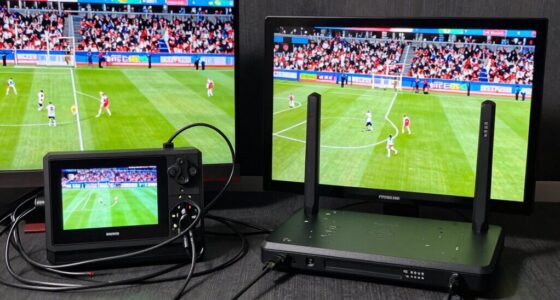
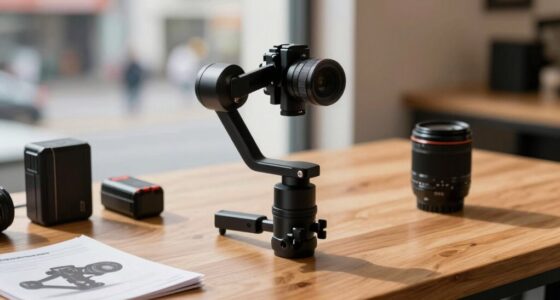
To build a repeatable event video workflow, start by planning and preparing, focusing on lighting and audio setup to guarantee consistency. Manage your equipment carefully with checklists and regularly review your inventory. Use techniques like audio synchronization with clapping or timecode to save editing time. Practice your process repeatedly, review footage, and make improvements based on feedback. Mastering these steps will help you produce polished videos efficiently—keep exploring to discover how to refine your workflow even further.

Get sports gear delivered free with Prime
- Fast, free delivery on millions of items
- Prime Video, Amazon Music and more included
- Member-only deals all year
Key Takeaways
- Establish a consistent workflow to ensure seamless, high-quality event videos and efficient management.
- Plan and prepare lighting and audio setups tailored to various environments for reliability.
- Use equipment checklists and documentation to maintain organization and streamline setup processes.
- Synchronize audio and video using standardized methods like timecode or clapping to save editing time.
- Continuously review, practice, and refine procedures to improve efficiency, confidence, and video quality.

Have you ever wondered how some event videos turn out seamless and professional every time? The secret lies in building a repeatable workflow that ensures consistency and quality. When you develop a clear process, it becomes easier to manage each shoot, avoid last-minute surprises, and produce polished videos efficiently. The foundation of this workflow starts with planning, where you decide on key elements like lighting setup and audio synchronization. These components are crucial because they directly impact the overall look and sound of your footage. You want your lighting setup to be reliable, so you can quickly adjust and replicate it across different events without wasting time. This means investing in versatile lighting gear and creating a standard setup that works well in various environments. When you master your lighting, the footage will have a professional look, and you’ll save time during post-production. Consistent workflow practices help you stay organized and prepared for any situation that may arise during filming. Developing standardized procedures further ensures that your team can efficiently execute each step without hesitation or confusion. Additionally, adopting best practices for equipment management can further streamline your process and prevent technical setbacks. Regularly reviewing your equipment and keeping an up-to-date inventory can also reduce unexpected delays. To reinforce your workflow, regularly updating your documentation and checklists based on past experiences can lead to continuous improvement.
A reliable lighting setup and clear audio sync are essential for professional, seamless event videos.
Audio synchronization is equally vital because poor sound quality or mismatched audio can ruin even the most visually stunning video. Establish a consistent system for capturing clean audio—whether you’re using wireless microphones, boom mics, or a combination—and ensure your audio recording devices are synchronized with your camera’s clock. Developing a method for syncing audio in post-production, such as clapping at the start of each recording or using timecode, helps streamline the editing process. This way, you don’t waste hours trying to match audio tracks manually, and your final product feels cohesive and well-polished. Additionally, regularly testing your equipment before each event can prevent technical issues that disrupt your workflow.
Once your lighting setup and audio synchronization methods are in place, you need to document your process. Create checklists or templates that guide you through each step, from setting up equipment to capturing b-roll footage. This documentation ensures that everyone on your team follows the same procedures, which maintains quality and speeds up the setup time. Additionally, it helps you identify areas where you can improve or streamline your workflow. Practicing these steps regularly will help you build confidence and efficiency in your production process. When you combine effective planning with consistent execution, your workflow becomes more resilient to unexpected challenges. Incorporating feedback from previous shoots can also help you refine your process further and adapt to new challenges.
Practice makes perfect. The more you repeat your process, the more intuitive it becomes. Over time, you’ll develop an instinct for quick setups, seamless transitions, and capturing the right shots. Regularly review your footage to identify what works and what doesn’t, refining your approach as needed. With consistency, you’ll build confidence in your ability to deliver professional videos on a regular basis. In the end, establishing a repeatable workflow that emphasizes reliable lighting setup and precise audio synchronization saves you time and elevates the quality of your event videos, making your production process more efficient and your final product consistently impressive.
professional event video lighting kit
As an affiliate, we earn on qualifying purchases.
As an affiliate, we earn on qualifying purchases.
Frequently Asked Questions
How Do I Choose the Right Equipment for My Event?
To choose the right equipment for your event, start by evaluating your lighting setup needs to guarantee clear, professional visuals. Select audio equipment that captures sound clearly without noise interference. Consider the event size and location to determine if you need portable or more robust gear. Prioritize versatility, quality, and ease of use, making sure your lighting and audio complement each other to produce a seamless, engaging video experience.
What Are Common Mistakes to Avoid in Workflow Setup?
You’ll want to avoid neglecting camera angles and audio balance—ironically, these are often overlooked but are essential. Don’t rely on a single camera shot or ignore sound issues, as they can ruin your entire video. Make sure your workflow setup includes varied camera angles for dynamic visuals, and double-check audio levels to prevent distortion. Overlooking these details can make even the best footage seem amateurish, so stay vigilant.
How Can I Ensure Consistent Video Quality Across Events?
You can guarantee consistent video quality by carefully planning your lighting setup and testing it beforehand to avoid fluctuations. Keep your lighting steady and evenly distributed across your scene. Additionally, prioritize audio clarity by using quality microphones and monitoring sound levels throughout the event. Regularly check your equipment and make adjustments as needed, so your footage remains professional and consistent, regardless of the event or environment.
What Software Tools Are Best for Editing Event Videos?
Imagine a painter with a vibrant palette—your editing software is just that. Adobe Premiere Pro and Final Cut Pro are top choices, offering robust tools for color grading and audio mixing. They let you craft polished videos that captivate viewers. DaVinci Resolve excels in color grading, giving your footage a cinematic look, while editing tools streamline audio mixing. These programs help you turn raw footage into a compelling, professional event video.
How Do I Manage Large Video File Storage Efficiently?
To manage large video files efficiently, you should use cloud storage solutions like Google Drive or Dropbox, which offer scalable space and easy access. Regularly back up your data to prevent loss, using automatic backup systems or external drives. Organize your files with clear folder structures, and delete unnecessary footage to save space. This approach guarantees your files are secure, accessible, and well-maintained for quick workflow retrieval.
wireless microphone for event recording
As an affiliate, we earn on qualifying purchases.
As an affiliate, we earn on qualifying purchases.
Conclusion
Now that you understand how to build a repeatable event video workflow, you’re equipped to streamline your process and deliver consistent results. Imagine filming a local festival: by following a set plan—prepping gear, capturing key moments, and editing efficiently—you save time and boost quality. With these steps in place, you’ll turn every event into a smooth, successful project, making your workflow not just reliable but also scalable for future gigs.
audio and video synchronization tools
As an affiliate, we earn on qualifying purchases.
As an affiliate, we earn on qualifying purchases.
As an affiliate, we earn on qualifying purchases.
Fall Picks
fall essentials
As an affiliate, we earn on qualifying purchases.