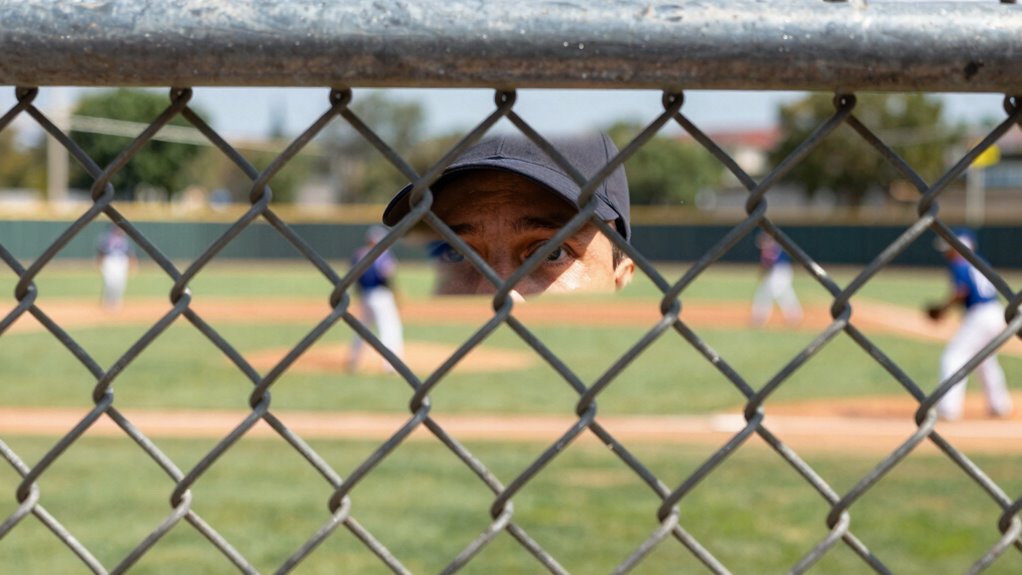

To shoot through catch fencing without losing your workflow, set your camera to a fast shutter speed of at least 1/1000 sec and use a wide aperture like f/2.8 or f/4 to blur the fence and gather more light. Pre-set your camera and test shots before the action begins, organize your gear for quick access, and position yourself to minimize reflections and glare. Staying prepared and efficient will help you capture sharp images quickly—if you keep going, you’ll discover more tips to perfect your technique.
Key Takeaways
- Pre-set camera settings and conduct test shots to ensure quick adjustments during action.
- Use versatile zoom lenses to adapt to different distances without repositioning.
- Maintain a small gap between lens and fencing to prevent damage and reduce glare.
- Position yourself to minimize reflections and glare from fencing material.
- Organize gear efficiently for rapid access and quick reaction during fast-paced moments.

Shooting through catch fencing can be a challenging yet rewarding skill to master, especially when quick reflexes and precision are required. The key lies in understanding how to adapt your camera settings and maintain safety precautions without sacrificing your workflow. First, you need to prepare your camera for the unique challenges of shooting through fencing. Use a fast shutter speed—at least 1/1000th of a second—to freeze motion and reduce the impact of the fence’s movement or vibrations. A wider aperture, such as f/2.8 or f/4, helps gather more light and creates a shallower depth of field, which can help blur out the fence and focus attention on your subject. Adjust ISO accordingly to maintain proper exposure, but be cautious not to introduce too much noise, especially in low-light conditions. Autofocus settings should be set to continuous or servo mode, so your camera can keep up with fast-moving subjects, and use a focus point that’s centered or tailored to your composition. Additionally, understanding how to camera settings effectively can greatly improve your success rate when shooting through fencing. Safety precautions are vital when shooting through catch fencing. Always be mindful of your surroundings and guarantee that you’re not putting yourself or others in harm’s way. Keep a safe distance from the fencing to avoid any accidental contact that could damage your equipment or cause injury. Wear protective gear if necessary, especially in environments where debris or projectiles could be a concern. Never lean or press your camera lens directly against the fencing; instead, hold your camera steady and keep a small gap to prevent scratches or damage. Be aware of the fencing’s structure—some fences are more forgiving than others—so adjust your position and lens angle to minimize reflections and glare, which can interfere with your shot. To streamline your workflow, consider pre-setting your camera to the best settings before the event begins. Practice a few test shots to verify your focus and exposure are accurate, and make quick adjustments if needed. Using a versatile zoom lens can help you adapt to different distances without changing your position. Furthermore, understanding the fencing’s material and design can assist you in choosing the optimal angle and approach for your shot. When shooting through catch fencing, patience and quick reflexes are essential. Anticipate moments of action, and be ready to shoot at a moment’s notice. Keep your gear organized and accessible, so you don’t waste precious seconds fumbling with settings or equipment. Being aware of cybersecurity principles, such as safeguarding your gear and personal data, can also help you maintain focus and avoid distractions during fast-paced situations. By combining proper camera settings with vigilant safety precautions, you’ll be able to capture sharp, compelling images through catch fencing without disrupting your workflow or risking safety.
Mastering Aperture, Shutter Speed, ISO and Exposure: How They Interact and Affect Each Other
As an affiliate, we earn on qualifying purchases.
As an affiliate, we earn on qualifying purchases.
Frequently Asked Questions
What Camera Settings Work Best for Shooting Through Catch Fencing?
You should use a narrow aperture, like f/8 or higher, to maximize depth of field and keep the subject sharp through the fencing. Focus techniques like continuous autofocus or pre-focusing on a specific point help maintain clarity. Adjust your shutter speed to freeze motion, and shoot in burst mode to increase chances of capturing a clean shot. These settings and techniques guarantee you get sharp images without disrupting your workflow.
How Can I Prevent Reflections or Glare When Shooting Through Fencing?
Think of reflective surfaces as mirrors that bounce unwanted light into your shot. To prevent reflections or glare when shooting through fencing, use a lens hood to block stray light and position yourself at different angles to minimize reflections. Employ glare reduction techniques like polarizing filters, which cut down on surface reflections and glare, ensuring your shot remains clear. Adjust your position and camera settings to keep the focus on your subject, not the reflective surfaces.
What Lens Choices Are Optimal for Capturing Through Catch Fencing?
You should choose a lens with a suitable focal length, typically a telephoto lens between 200mm and 400mm, to zoom in effectively through the fencing. Using lens filters, like a polarizer, can reduce glare and reflections, improving clarity. Opt for a lens with a wide aperture to gather more light and create a pleasing background blur, which helps emphasize your subject despite the fencing obstruction.
How Do I Avoid Damaging My Camera Equipment With Fencing Debris?
Imagine your camera as a brave knight facing a barrage of debris impact from fence materials like metal or plastic. To avoid damage, use a protective filter, like a UV or clear filter, to shield your lens. Keep your camera steady and angle it slightly to deflect debris, and regularly check for dirt or scratches. These simple steps turn your camera from vulnerable to resilient amidst the chaos.
Are There Specific Times of Day That Improve Shot Quality Through Fencing?
You’ll find that shooting during early morning or late afternoon improves shot quality through fencing, thanks to softer lighting conditions that reduce glare and reflections. The fence material also matters; chain-link fences can be more transparent with the right settings, while solid or mesh fences may require adjustments to compensate for light filtering through. Shooting during these times enhances clarity and minimizes harsh shadows, helping you capture better shots through catch fencing.

Tamron 28-75mm F/2.8 Di III VXD G2 for Sony E-Mount Full Frame/APS-C (6 Year Limited USA Warranty)
- Autofocus Motor: Fast, quiet VXD linear motor
- Close-up Capability: 7.1” MOD and 1:2.7 magnification
- Design & Comfort: Enhanced texture and user-friendliness
As an affiliate, we earn on qualifying purchases.
As an affiliate, we earn on qualifying purchases.
Conclusion
So, next time you’re tempted to shoot through catch fencing, remember—it’s a gamble. Sure, it might give you that perfect shot, but it could also ruin your workflow or damage your gear. Ironically, risking it all for a fleeting shot might cost you more than you think. Sometimes, patience and proper positioning save your day—and your equipment—more than a risky pass through the fence ever could. Choose wisely; the best shot isn’t always the closest.

Amazon Basics UV Protection Camera Lens Filter, Scratch Resistant, Photography Filter, Lens Protection, 58mm
- UV Protection for Daily Use: Filters ultraviolet light and reduces bluish cast
- Lens Protection: Guard against dust, dirt, and scratches
As an affiliate, we earn on qualifying purchases.
As an affiliate, we earn on qualifying purchases.

Canon EF 75-300mm f/4-5.6 III Telephoto Zoom Lens (Black)
- Focal Length & Aperture: 75-300mm f/4-5.6
- Lens Construction: 13 elements in 9 groups
- Diagonal Angle of View: 32° 11' – 8° 15'
As an affiliate, we earn on qualifying purchases.
As an affiliate, we earn on qualifying purchases.