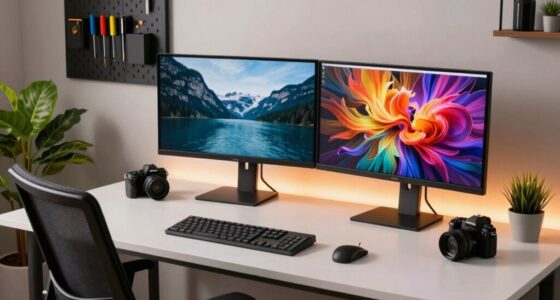
When you compare cheap and premium dual monitor setups for photographers, the differences are clear. Premium monitors offer superior color accuracy and sharp resolution, which are vital for post-editing work. You’ll also find better ergonomics with adjustable stands, reducing neck and back strain. Plus, premium options boast durability and enhanced connectivity. Investing in quality gear not only improves your workflow but also enhances your overall creative experience. There’s much more to explore about these setups.

Get sports gear delivered free with Prime
- Fast, free delivery on millions of items
- Prime Video, Amazon Music and more included
- Member-only deals all year
Key Takeaways
- Color Accuracy: Premium monitors provide superior color calibration, ensuring accurate representation for photography work, while budget monitors may compromise on color fidelity.
- Ergonomics: Adjustable stands in premium setups enhance comfort during long editing sessions, reducing the risk of neck and back strain compared to fixed budget monitors.
- Build Quality: Premium monitors are constructed from higher-quality materials, offering greater durability and fewer issues like flickering or dead pixels over time.
- Connectivity Options: Premium monitors feature a wider range of ports, such as USB-C and DisplayPort, allowing for better integration and flexibility in setups.
- Overall Experience: Investing in premium dual monitor setups enhances creative visualization and productivity, leading to a more satisfying editing process for photographers.

When you’re deep in the creative process, having a dual monitor setup can transform your photography workflow. It’s not just about having more screen real estate; it’s about enhancing your ability to visualize, edit, and manage your images effectively. But when you’re choosing between cheap and premium options, the differences can be striking, impacting your overall experience.
With budget monitors, you might save some cash initially, but you could be sacrificing color accuracy, resolution, and durability. If you’re serious about photography, you know how essential calibration techniques are. Cheap monitors often come with limited settings, making it hard to achieve that perfect color balance. You might find that your images look great on your screen but fall flat when printed. Premium monitors, on the other hand, offer superior calibration capabilities. They often support hardware calibration, allowing you to fine-tune your display to match your creative vision.
Investing in premium monitors ensures accurate color, better resolution, and essential calibration for your photography workflow.
Ergonomic considerations also play a significant role when comparing cheap and premium setups. You might not think twice about monitor height, tilt, or swivel, but these factors can affect your comfort during long editing sessions. Cheap monitors often lack adjustable stands, forcing you to settle for an uncomfortable viewing angle. This can lead to neck and back strain, making your creative process more taxing than enjoyable. Premium setups usually come with ergonomic stands, letting you adjust your monitors to the ideal height and angle, thereby enhancing your comfort and productivity. Additionally, choosing ergonomic features can further improve your overall experience and reduce fatigue. Incorporating ergonomic design principles can help prevent long-term health issues associated with prolonged screen time. Ensuring your workspace supports good ergonomics is crucial for maintaining your well-being over time. Furthermore, higher-quality monitors often have longer-lasting components, which contribute to their durability and reliability over many years of use.
Another key difference lies in the build quality and durability. Cheap monitors may look appealing, but they often compromise on materials and technology. You could end up dealing with screen flicker or dead pixels much sooner than you’d like. Premium monitors are built to last, with better warranties and customer support. Investing in a more expensive setup can save you money in the long run, as you won’t need to replace it as frequently. Additionally, premium monitors often utilize higher-quality display panels, which contribute to a more consistent and reliable user experience.
Lastly, consider the connectivity options. Cheap monitors might limit you to basic ports, while premium monitors often offer a wider range of connections, including USB-C and DisplayPort. This flexibility can make a big difference in how easily you integrate your monitors into your existing setup. Being aware of connectivity options can help you choose a monitor that seamlessly fits into your workflow and future-proof your investment.
dual monitor setup for photographers
As an affiliate, we earn on qualifying purchases.
As an affiliate, we earn on qualifying purchases.
Frequently Asked Questions
Can I Use Different Brands for Dual Monitors?
Yes, you can use different brands for dual monitors, but monitor compatibility is key. Make sure both monitors support similar resolutions and refresh rates for a seamless experience. While brand synergy isn’t essential, it can enhance your setup’s performance and aesthetics. Mixing brands might lead to slight variations in color and display quality, so calibrating them can help achieve a more uniform look. Ultimately, it’s about what works best for your needs.
How Do I Connect Multiple Monitors to My Laptop?
Connecting multiple monitors to your laptop is like expanding your canvas as an artist. First, check your laptop compatibility; many have HDMI, DisplayPort, or USB-C ports. Use an adapter if needed. Next, consider resolution; verify your monitors match your laptop’s output capabilities for the best experience. Once you’ve connected them, adjust your display settings in your operating system to arrange and optimize how you want your workspaces to flow. Enjoy the extra screen real estate!
What Software Helps Manage Dual Monitor Setups?
To manage your dual monitor setup effectively, consider using monitor management software options like DisplayFusion or UltraMon. These programs let you customize your desktop, manage window placement, and create keyboard shortcuts for switching between displays. They enhance your workflow by allowing you to control multiple monitors seamlessly. You’ll find that these tools help you optimize your screen space, making your tasks more efficient and enjoyable.
Are Curved Monitors Better for Photography Work?
Curved monitors are like a hug for your eyes, wrapping around your field of view. They offer unique curved benefits, enhancing your immersion in photography work. You’ll find that the curvature helps reduce distortion, making it easier to focus on details. Plus, many curved monitors boast excellent color accuracy, which is essential for editing your photos. If you want a more engaging experience, consider upgrading to a curved setup for your photography needs.
How Much Desk Space Do I Need for Dual Monitors?
You’ll need at least 48 to 60 inches of desk space for a comfortable dual monitor arrangement. This gives you room for both monitors, plus any additional accessories like keyboards and mice. Aim for good desk organization to keep your workspace tidy and efficient. Consider your monitor sizes too—larger screens require more space. Make sure you’ve got enough area to create an ergonomic setup that works for you.
color calibrated monitors for photography
As an affiliate, we earn on qualifying purchases.
As an affiliate, we earn on qualifying purchases.
Conclusion
In the world of photography, investing in a premium dual monitor setup isn’t just a luxury; it’s like giving your creative vision a superpower. While cheap options might get the job done, they can’t compete with the color accuracy and build quality that premium monitors offer. You deserve to see your work in the best light possible. So when you’re choosing your setup, remember: your art deserves nothing less than the best.
ergonomic adjustable monitor stands
As an affiliate, we earn on qualifying purchases.
As an affiliate, we earn on qualifying purchases.
high resolution professional monitors
As an affiliate, we earn on qualifying purchases.
As an affiliate, we earn on qualifying purchases.
NFL season / tailgating Picks
team gear
As an affiliate, we earn on qualifying purchases.