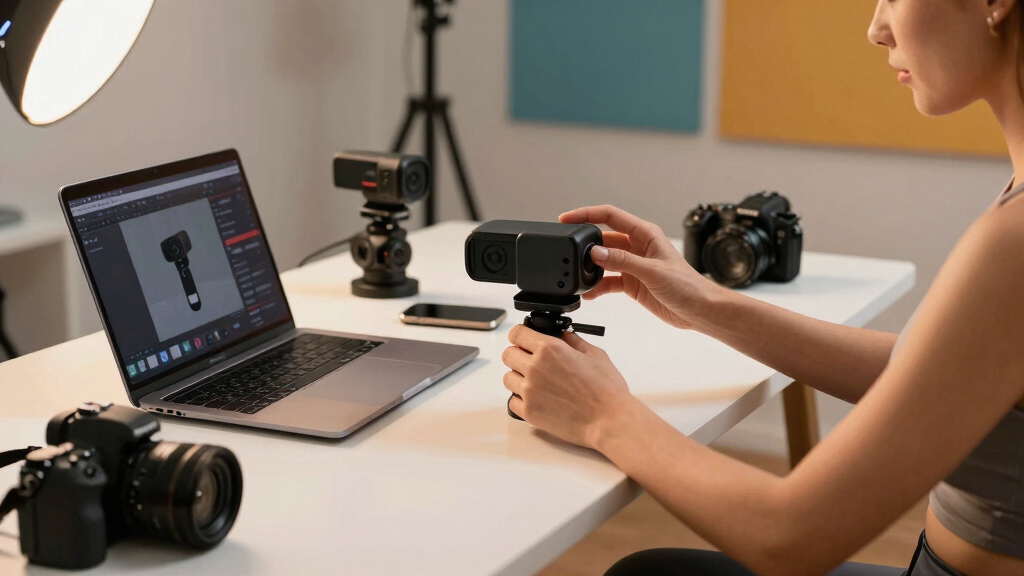

Choosing the best webcams for creator studios involves balancing image quality, ease of use, and features tailored for content creators. The Acer 4K Webcam with Sony sensor stands out for stunning resolution and autofocus, making it ideal for professional-looking streams. The Insta360 Link 2 offers AI tracking and HDR, perfect for dynamic presentations. Meanwhile, the Elgato Facecam 4K provides DSLR-like control for serious creators. Every option involves tradeoffs—such as price versus performance or feature complexity—so continue reading for a detailed breakdown to find your best fit.
Key Takeaways
- Top-tier webcams like the Acer 4K and Elgato Facecam deliver exceptional image quality suited for professional content creation.
- AI tracking and advanced features are mostly found in models like Insta360 Link 2 and Logitech MX Brio, enhancing live interaction and production value.
- Price varies significantly, with premium options offering extensive controls, while more affordable models still deliver solid HD quality.
- Build quality and ease of use differ; premium models often have better ergonomics and user interfaces that suit studio setups.
- Tradeoffs often revolve around complexity versus simplicity—more advanced features can require a learning curve or additional setup time.
| Acer 4K Webcam with Sony Sensor, PDAF Autofocus, Dual Mics & Privacy Cover for PC/Mac |  | Best Overall for High-End Creators | Resolution: 4K UHD | Sensor Type: Sony 1/2″ CMOS | Autofocus Technology: Phase Detection Autofocus (PDAF) | VIEW LATEST PRICE | See Our Full Breakdown |
| Insta360 Link 2 PTZ 4K Webcam with AI Tracking, HDR, and Noise-Canceling Mic for PC/Mac | 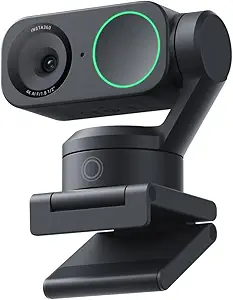 | Best for Dynamic Content and AI Tracking | Sensor Type: CMOS | Resolution: UHD 4K | Focus Type: Auto Focus | VIEW LATEST PRICE | See Our Full Breakdown |
| Logitech StreamCam Full HD 1080p Webcam for Streaming and Content Creation – Graphite |  | Best for Smooth Streaming at 60 fps | Resolution: Full HD 1080p | Frame Rate: 60 fps | Lens Type: Premium glass lens | VIEW LATEST PRICE | See Our Full Breakdown |
| Logitech Brio 101 Full HD 1080p Webcam with Built-in Mic and Privacy Shutter – Black |  | Best Budget-Friendly Full HD Webcam | Resolution: Full HD 1080p | Brightness Boost: Up to 50% | Privacy: Built-in shutter | VIEW LATEST PRICE | See Our Full Breakdown |
| Elgato Facecam 4K – 4K60 Studio Webcam with DSLR-Like Control and Lens Filters |  | Best for Professional-Grade Creative Control | Sensor Type: Sony STARVIS 2 CMOS | Resolution: 4K UHD at 60 fps | Lens Support: 49mm filters | VIEW LATEST PRICE | See Our Full Breakdown |
| Logitech Brio 4K Webcam |  | Best Overall for Versatile Studio Quality | Resolution: 4K at 30 fps | Field of View Options: 65°, 78°, 90° diagonal | Microphone: Dual omnidirectional with noise cancellation | VIEW LATEST PRICE | See Our Full Breakdown |
| Logitech MX Brio Ultra HD 4K Webcam with AI Enhancement and Show Mode (Graphite) |  | Best for Interactive Presentations and Low-Light Clarity | Resolution: 4K (30fps) / 1080p (60fps) | Sensor: 70% larger pixels, largest webcam sensor | Microphones: Dual beamforming noise-reducing mics | VIEW LATEST PRICE | See Our Full Breakdown |
More Details on Our Top Picks
Acer 4K Webcam with Sony Sensor, PDAF Autofocus, Dual Mics & Privacy Cover for PC/Mac
This Acer 4K webcam stands out for its stunning UHD resolution, thanks to a Sony 1/2″ sensor that delivers crisp, HDR-enhanced images even in challenging lighting. Its fast PDAF autofocus ensures your shot remains sharp during movement, outperforming webcams like the Logitech Brio 101, which lacks such rapid focus. The dual noise-canceling mics provide clear audio, a key advantage over many competitors that only offer basic built-in mics. Its lightweight, portable design makes it easy to set up anywhere, but it’s limited to USB-A connectivity, which could be a hurdle for newer laptops. With no advanced software features beyond plug-and-play, it’s a straightforward, premium choice for creators who prioritize top-tier video quality and mobility. The main tradeoff is its higher price, reflecting its high-end specs and build quality.
Pros:- Exceptional 4K HDR video with low-light performance
- Fast PDAF autofocus for stable, sharp video
- Dual noise-canceling microphones ensure clear sound
- Lightweight, portable design (57g)
Cons:- Limited to USB-A connection, no wireless option
- Basic software features, no advanced customization
Best for: High-end content creators and streamers who want the best video quality and portability
Not ideal for: Budget-conscious users or those needing wireless webcams, as it lacks wireless options and has a premium price
- Resolution:4K UHD
- Sensor Type:Sony 1/2″ CMOS
- Autofocus Technology:Phase Detection Autofocus (PDAF)
- Microphones:Dual noise-canceling digital mics
- Privacy Feature:Magnetic privacy cover
- Compatibility:Windows, Mac, ChromeOS
Bottom line: This webcam is ideal for creators who demand top-tier resolution, autofocus, and portability in a premium package.
Insta360 Link 2 PTZ 4K Webcam with AI Tracking, HDR, and Noise-Canceling Mic for PC/Mac
The Insta360 Link 2 is designed for creators who need versatile movement and intelligent tracking, making it stand out among static webcams like the Logitech StreamCam. Its AI-powered tracking and gesture controls enable smooth, hands-free framing, ideal for dynamic presentations or performances. The 4K HDR and low-light capabilities improve image quality over standard webcams, but it’s incompatible with ARM-based Windows systems, limiting flexibility. Its physical PTZ controls allow precise movement, yet it lacks image stabilization, which could affect smoothness during rapid pan or tilt. Requiring a separate 9V battery adds complexity, but this tradeoff supports its advanced tracking features. Overall, it suits creators who want movement and automation in their studio setup but are willing to manage some logistical quirks.
Pros:- 4K HDR video with excellent low-light performance
- AI tracking and gesture controls for dynamic framing
- Physical PTZ controls for precise movement
- Advanced modes like DeskView and Whiteboard
Cons:- Not compatible with ARM-based Windows systems
- Requires separate 9V battery (not included)
- No image stabilization for rapid movement
Best for: Streamers, presenters, and content creators who benefit from AI tracking and mobility
Not ideal for: Users with ARM-based Windows devices or those seeking a plug-and-play setup without additional batteries
- Sensor Type:CMOS
- Resolution:UHD 4K
- Focus Type:Auto Focus
- Features:DeskView, Whiteboard, AI Tracking
- Connection:USB
- Dimensions:2.06″ x 2.72″ x 1.62″
Bottom line: This webcam is best suited for creators who want intelligent tracking and versatility but can manage its setup quirks.
Logitech StreamCam Full HD 1080p Webcam for Streaming and Content Creation – Graphite
The Logitech StreamCam offers 1080p resolution at 60 fps, making it a reliable choice for creators focused on smooth, professional-looking streams. Its smart autofocus and auto-framing features help maintain focus and composition during movement, surpassing webcams like the Logitech Brio 101, which lacks auto-framing. Compatible with a wide range of platforms via USB-C, it’s a solid option for those who want easy integration with streaming software. However, its dependence on USB-C may limit compatibility with older devices, and the setup process can be complex for beginners unfamiliar with Logitech Capture software. Its high frame rate makes it ideal for fast-paced content, but it doesn’t support higher resolutions like 4K, which might be a drawback for those needing ultra-high detail.
Pros:- Smooth 1080p at 60 fps for fluid video
- Smart autofocus and auto-framing keep you centered
- Versatile mounting options for different setups
- Works seamlessly with major streaming platforms
Cons:- Requires USB-C port, limiting older device compatibility
- No 4K support, limiting resolution for high-detail needs
- Software setup can be challenging for beginners
Best for: Streamers and content creators prioritizing ultra-smooth 1080p at 60 fps with flexible mounting options
Not ideal for: Users with only USB-A ports or those needing 4K resolution for high-detail production
- Resolution:Full HD 1080p
- Frame Rate:60 fps
- Lens Type:Premium glass lens
- Features:Auto-framing, smart autofocus
- Compatibility:USB-C
- Software:Logitech Capture
Bottom line: This webcam is ideal for streamers who want ultra-smooth 1080p video with intelligent framing and focus tracking.
Logitech Brio 101 Full HD 1080p Webcam with Built-in Mic and Privacy Shutter – Black
The Logitech Brio 101 provides reliable 1080p video quality with built-in features tailored for everyday creators. Its RightLight technology enhances brightness by up to 50%, reducing shadows and improving clarity, especially in less ideal lighting conditions. The included privacy shutter adds security during off-hours, and the built-in microphone simplifies setup. Compared to higher-end models like the Elgato Facecam, it offers fewer customization options and lower resolution but remains a practical, budget-friendly choice. Its reliance on USB-A may pose compatibility issues with newer laptops, but the eco-friendly design, using 34% recycled plastic, is a plus for sustainability-minded buyers. It’s best suited for casual streamers or remote workers who want decent quality without breaking the bank.
Pros:- Good quality 1080p video with brightness boost
- Privacy shutter for security
- Built-in microphone simplifies setup
- Eco-friendly design with recycled plastic
Cons:- Only 34% recycled plastic, lower than some competitors
- Limited resolution, no 4K support
- Requires USB-A port, which may need adapters
Best for: Budget-conscious creators needing reliable HD video and basic privacy features
Not ideal for: Professional streamers or high-production content creators who require 4K or advanced controls
- Resolution:Full HD 1080p
- Brightness Boost:Up to 50%
- Privacy:Built-in shutter
- Microphone:Built-in
- Compatibility:USB-A
- Plastic Content:34% post-consumer recycled
Bottom line: This webcam offers decent HD quality and essential features at an accessible price point, perfect for casual or remote work use.
Elgato Facecam 4K – 4K60 Studio Webcam with DSLR-Like Control and Lens Filters
The Elgato Facecam 4K is crafted for creators who seek DSLR-like quality and creative flexibility. Its Sony STARVIS 2 CMOS sensor delivers stunning 4K60 video with vibrant colors and sharp detail, making it stand out against standard webcams like the Logitech StreamCam. The support for 49mm lens filters allows for professional styling, while the internal HDR and uncompressed video ensure high-quality output. Its software control enables fine-tuning of focus, exposure, and color, appealing to creators who want precise control over their visuals. However, the absence of image stabilization may cause issues during rapid movements, and the higher price could deter casual users. This camera is best for creators who prioritize cinematic quality and creative editing over portability or auto features.
Pros:- Exceptional 4K60 video quality with vibrant colors
- DSLR-like manual control via software
- Supports 49mm lens filters for creative effects
- HDR and uncompressed video for high fidelity
Cons:- No image stabilization, which can affect smoothness
- Higher price point limits accessibility for casual users
Best for: Professional streamers, videographers, and creators demanding DSLR-like control and high-resolution output
Not ideal for: Casual users or those on a tight budget, since it lacks features like stabilization and is more expensive
- Sensor Type:Sony STARVIS 2 CMOS
- Resolution:4K UHD at 60 fps
- Lens Support:49mm filters
- Features:HDR, Uncompressed video
- Connectivity:USB-C
- Weight:0.12 kg
Bottom line: This webcam is tailored for creators who want cinematic-quality visuals and extensive creative control, accepting higher cost and setup complexity.
Logitech Brio 4K Webcam
The Logitech Brio 4K Webcam stands out for delivering professional-grade video with 4K resolution at 30 fps, making it ideal for creators who need sharp, detailed footage. Its autofocus and digital zoom ensure crisp images even when moving slightly, while the dual noise-canceling microphones provide clear audio without added equipment. Compared to the Logitech MX Brio, this model offers slightly more straightforward controls but lacks some AI-enhanced features for low-light clarity. The inclusion of RightLight 3 and HDR technology ensures consistent image quality across various lighting setups, a crucial factor for studio environments. The privacy shutter adds security, but the higher price and somewhat steep learning curve for the Logi Options+ app could be hurdles for newcomers. This webcam is perfect for creators who want premium quality and reliable performance without sacrificing flexibility.
Pros:- Exceptional 4K resolution with autofocus and digital zoom
- Noise-canceling dual microphones for clear audio
- Automatic light adaptation via RightLight 3 and HDR technology
- Attachable privacy shutter for security
Cons:- Higher price point compared to standard webcams
- Logi Options+ app can be complex for beginners
Best for: Professional content creators and streamers needing high-resolution video in varied lighting conditions.
Not ideal for: Budget-conscious users or those new to streaming who prefer simple plug-and-play devices without advanced settings.
- Resolution:4K at 30 fps
- Field of View Options:65°, 78°, 90° diagonal
- Microphone:Dual omnidirectional with noise cancellation
- Compatibility:Windows 11, Mac, ChromeOS
- Privacy Feature:Attachable privacy shutter
- Autofocus:Yes
- HDR Technology:Yes
Bottom line: This webcam suits creators who prioritize professional video quality and are comfortable managing advanced features.
Logitech MX Brio Ultra HD 4K Webcam with AI Enhancement and Show Mode (Graphite)
The Logitech MX Brio offers a flexible, high-end solution with 4K resolution at 30 fps or 1080p at 60 fps, making it a solid choice for creators who want both quality and versatility. Its AI-enhanced image processing improves clarity in challenging lighting, outperforming models like the Brio 4K by adding intelligent adjustments that simplify setup. The dual beamforming microphones ensure excellent audio, while the Show Mode feature lets creators share physical notes or items directly during calls—an asset for educational or collaborative content. However, its USB-C connection may require adapters for older setups, and the premium price can be a barrier for budget-conscious creators. Compared to the standard Brio, this model emphasizes enhanced image quality and interactive features, making it ideal for studio creators who value a multi-functional, premium device.
Pros:- Ultra HD 4K resolution with AI-enhanced clarity
- Dual noise-canceling microphones for superior audio
- Show Mode for sharing physical notes during calls
- Large sensor with 70% bigger pixels for better low-light performance
Cons:- Requires USB-C or adapters for some devices
- Higher price compared to basic webcams
Best for: Content creators and educators who need high-quality video with interactive sharing and superior low-light performance.
Not ideal for: Casual streamers or users with older computers lacking USB-C ports who prefer straightforward webcams without advanced AI features.
- Resolution:4K (30fps) / 1080p (60fps)
- Sensor:70% larger pixels, largest webcam sensor
- Microphones:Dual beamforming noise-reducing mics
- Compatibility:Windows, macOS, Chrome OS, Linux, Nintendo Switch 2
- Privacy Feature:Built-in webcam cover
- Special Features:Show Mode for physical notes
- Low-Light Performance:AI enhancement with larger pixels
Bottom line: This webcam is tailored for creators who need top-tier image quality, interactive features, and are willing to invest in a premium setup.
How We Picked
The selection process focused on evaluating webcams based on performance, video quality, usability, build quality, and value for creator studios. We prioritized models with high-resolution options, advanced autofocus, and features like AI tracking or professional controls. Ease of setup and compatibility with streaming software also played a role, as these are critical for studio environments. The ranking reflects a balance between professional-grade features and accessibility for different creator skill levels, ensuring options for beginners to advanced users.Factors to Consider When Choosing Best Webcams For Creator Studios
When choosing a webcam for a creator studio, it’s essential to consider factors beyond just resolution. Performance in different lighting conditions, ease of use, and integration with streaming tools can significantly impact your experience. Additional features like autofocus, built-in microphones, and adjustable settings should align with your content style. Budgeting appropriately for premium features versus essential quality can prevent overspending on unnecessary extras or sacrificing core performance. Understanding these factors will help you select a webcam that enhances your workflow and content quality.Video Resolution and Frame Rate
High resolution, such as 4K, is ideal for professional studio quality, but it requires more powerful hardware and storage. For real-time streaming, a smooth 60fps can make motion appear more natural, especially when capturing fast-paced content. Consider your streaming platform’s capabilities and your editing needs when choosing resolution and frame rate; premium models often support both, providing flexibility for different projects.
Autofocus and Tracking Features
Fast, reliable autofocus is critical in dynamic studio environments where you move around or switch between shots. AI tracking features, like those in Insta360 Link 2, can automatically keep you centered and in focus without manual adjustments, saving time and improving professionalism. However, these advanced features come at a higher price and may require software calibration, so weigh their benefits against your workflow complexity.
Build Quality and Ease of Setup
Durability and ergonomic design matter, especially in a studio setting where equipment is used frequently. Look for webcams with sturdy mounts, adjustable stands, and compatibility with your existing setup. Ease of setup—such as plug-and-play connectivity and intuitive controls—can reduce frustration and help you get started quickly, especially if you’re new to studio setups.
Audio Quality and Microphones
While many webcams have built-in microphones, their quality varies. For studio use, consider models with noise-canceling microphones or plan to pair your webcam with an external mic. Good audio is often more noticeable than video quality, so weigh this factor carefully if your content heavily relies on voice clarity and sound professionalism.
Compatibility and Software Integration
Ensure the webcam is compatible with your streaming or recording software, such as OBS or Streamlabs. Some webcams come with proprietary software that enhances features like image adjustments or tracking, which can streamline your workflow. Compatibility issues can cause delays or quality loss, so verify device support before purchase, especially if you have a specific setup in mind.
Frequently Asked Questions
Is 4K resolution necessary for my creator studio?
While 4K resolution provides the highest detail and future-proofs your content, it isn’t always necessary for every creator. If your streaming setup and hardware support it, 4K can enhance production quality, especially for professional or multi-platform publishing. However, for live streaming, 1080p at 60fps can often deliver smooth, high-quality visuals with less bandwidth and system strain, making it a practical choice for many creators.
Should I prioritize autofocus over resolution?
Autofocus ensures your image remains sharp even if you move around, which is vital for dynamic content. While resolution is important for clarity, a high-resolution webcam with poor autofocus can result in blurry shots when you shift position. For most creators, a balance—such as 4K resolution with reliable autofocus—is ideal, but if you frequently change positions, autofocus may outweigh higher resolution in importance.
Do I need a webcam with built-in microphones?
Many webcams include microphones, but their quality varies widely. If audio clarity is critical for your studio, consider models with higher-quality, noise-canceling microphones or plan to use an external mic. Pairing a good external microphone with a decent webcam can significantly boost overall sound quality, which is often more noticeable to viewers than video resolution alone.
Are premium webcams worth the extra cost?
Premium webcams typically offer higher resolution, better low-light performance, and advanced features like AI tracking, which can elevate your studio quality. However, they also come with a higher price tag and sometimes more complex setup. If your content demands professional-level visuals or you prioritize automation and versatility, investing in a premium model makes sense. For casual or beginner creators, more affordable options may suffice.
How important is lighting when using a webcam in a studio?
Lighting has a significant impact on webcam quality, often more than the camera itself. Proper, diffused lighting ensures your face and background are well-illuminated, reducing noise and improving color accuracy. Even the best webcam can struggle in poor lighting conditions, so investing in good studio lighting can greatly enhance your video quality, regardless of the webcam you choose.
Conclusion
For creators seeking the best overall performance with professional features, the Acer 4K Webcam stands out thanks to its high resolution and autofocus. Those on a tighter budget or looking for advanced tracking might prefer the Insta360 Link 2 for its AI capabilities. Beginners or casual streamers could find value in the Logitech StreamCam for ease of use, while premium users aiming for DSLR-like control will appreciate the Elgato Facecam 4K. Ultimately, your choice depends on your content needs, budget, and technical comfort—consider these factors carefully to select the right webcam for your studio.